
A website with more pages isn’t always the better choice. If your customers need to compare options, update information or complete tasks without repeated full-page reloads, a single page app may create a more natural experience.
It’s understandable to wonder how this differs from a conventional website, and whether the trade-offs are right for your business. A single page app loads its main page once, then updates content as people interact with it. That can suit a data-driven service or interactive tool, but it isn’t automatically the best fit for every website.
This guide explains how single-page apps work, where they differ from traditional websites and when they can support your users’ goals. You’ll also learn what to consider around performance, search visibility, accessibility and future maintenance, plus practical questions to discuss with a development partner before choosing an approach.
Key Takeaways
- Assess whether users need to complete interactive tasks or mainly find and read information before choosing a website structure.
- A single page app can update content without a full page reload, but weigh that experience against loading, search visibility, accessibility and maintenance needs.
- Map users, essential tasks and screens to clarify what your project must deliver before discussing how to build it.
- Agree how you’ll assess performance, accessibility, security and ongoing ownership with your development partner.
What is a single-page app, and how does it work?
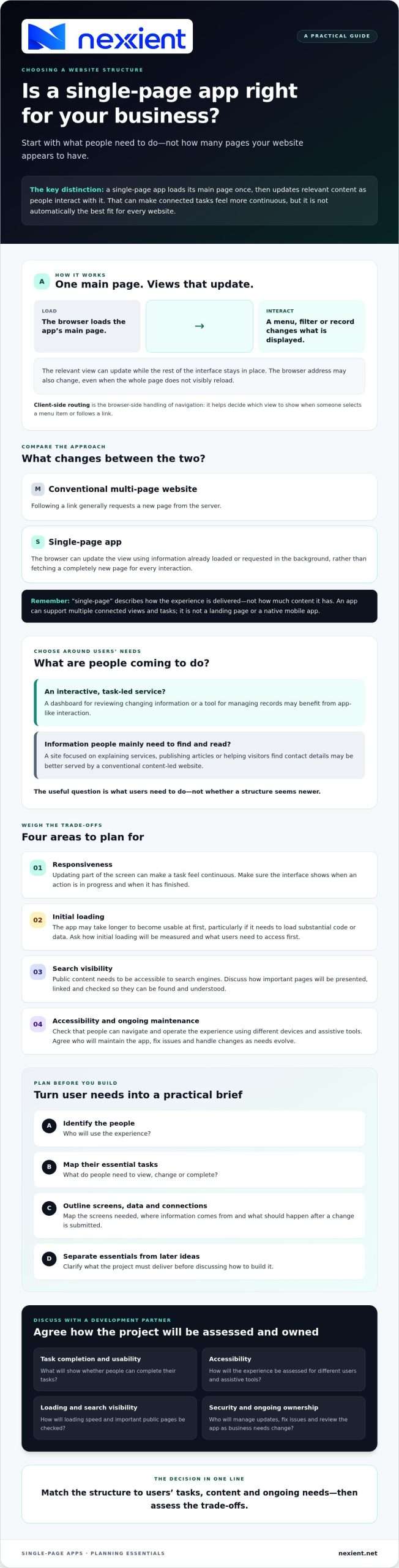
A single-page app loads its main web page, then updates the relevant content as you use it, rather than reloading an entirely new page for every interaction. For example, selecting a menu option, filtering results or opening a record can change what’s displayed while the rest of the interface stays in place.
A single-page app is a web application that changes views and content in the browser without loading a new page for each interaction. The browser address may change as you move between views, even when the whole page doesn’t visibly reload. Wikipedia’s overview of the Single-page application explains the broader technical approaches and challenges.
How is a single-page app different from a conventional website?
Both types of website can offer several pages or views. The difference is how those changes reach your browser. A conventional multi-page website generally requests a new page from the server when you follow a link. In a single-page app, the browser can update the view using information already loaded or requested in the background.
This browser-side handling of navigation is called client-side routing. In plain terms, it helps the app decide which view to show when someone selects a menu item or follows a link, without always fetching a completely new page. The experience can feel more continuous, although each view still needs a clear purpose and useful content.
“Single-page” describes the delivery approach, not the amount of content. It doesn’t mean a one-section landing page or a native mobile app. A focused landing page is designed around a particular message or action; a single-page app can support a range of connected tasks and views. The useful question is what users need to do, not how many pages the experience appears to contain.
When does a single-page app make sense for a business?
Choose the structure around what people need to do. A task-led service, such as a dashboard for reviewing changing information or a tool for managing records, may benefit from app-like interaction. For these tailored, data-led experiences, data-driven web application development may be relevant. By contrast, a site whose main purpose is to explain services, publish articles or help visitors find contact details may be better served by a conventional content-led website.
Before deciding, compare the practical trade-offs against your users’ priorities:
- Responsiveness: Updating part of the screen can make a task feel continuous. Make sure the interface clearly shows when an action is in progress and when it has finished.
- Initial loading: The app may take longer to become usable at first, particularly if it needs to load substantial code or data. Ask how the team will measure initial loading and what content users need to access first.
- Search visibility: Public content needs to be accessible to search engines. Ask how important pages will be presented, linked and checked so they can be found and understood.
- Accessibility and maintenance: Check that people can navigate and operate the experience using different devices and assistive tools. Agree who will maintain the app, fix issues and handle changes as your needs evolve.
For a concise technical overview, MDN explains how SPAs work. Use it as background, then assess your users’ tasks, content and ongoing needs with a development partner. For a Worcestershire business, that means starting with the service your customers need, rather than choosing a structure simply because it is newer.
Is a single-page app different from a landing page or mobile app?
Yes. A landing page is usually built around a specific message or action, such as making an enquiry. It describes the page’s purpose, not how its content is delivered. A single-page app runs in a web browser and can support multiple interactive views; it isn’t a native mobile app. If a focused marketing page may be enough, compare it with Nexient’s landing page design. To discuss which approach fits your requirements, contact the team.
How should you plan a single-page app project?
Start with the people who will use it, not the technology. Identify their main tasks, map the screens needed to complete them, then list the data and connections to other systems the app requires. For example, note which information users need to view or update, where that information comes from and what should happen after they submit a change. This creates a practical brief and helps separate essential features from ideas that can wait.
Next, agree how you’ll judge whether the project is working. Set clear measures for task completion and usability, and decide how the team will assess accessibility, loading speed, search visibility and security. Also clarify who will manage updates, fix issues and review the app as business needs change. MDN’s overview of a single-page application (SPA) can help frame technical discussions, but your user requirements should guide the final approach.
If your project involves tailored workflows or connected business information, Nexient’s data-driven web application development and custom CRM systems may be relevant. Worcestershire businesses can discuss the project’s needs and fit, rather than assuming a particular build approach is right.
What should you ask a web app development partner?
Use early conversations to test the proposal against real tasks. Ask:
- How will the design help users complete each priority task?
- How will people find key content, and how will accessibility and performance be assessed?
- Which data sources and system connections are required, and who will maintain them?
- How will changes to requirements be reviewed, prioritised and managed over time?
Bring your task list, essential screens and success measures to the discussion. Ask for the proposed approach to be explained in terms of those requirements. The answers can reveal gaps before they become costly rework. If you’re exploring whether a single page app fits your project, discuss your web application project with Nexient.
Choose the right foundation for your next digital project
The right approach depends on what your users need to achieve. A single page app can suit experiences built around frequent interaction and connected tasks, whilst a content-led website may be a better fit when visitors mainly need to find and read information. Before choosing, define the users, priority tasks and essential screens, then consider performance, accessibility, search visibility and ongoing ownership.
A clear brief gives you a stronger basis for discussing the options with a development partner. Nexient designs and develops data-driven web applications and custom CRM systems, bringing clean design, development and practical strategy together for business digital projects. For businesses in Worcestershire, the conversation can focus on local business requirements and user goals, rather than assuming a particular build is right.
Discuss your web application project with Nexient and explore an approach that fits your users and business needs. With the right foundations in place, you can move forward with greater clarity and confidence.
Frequently Asked Questions
What is a single-page app?
A single-page app is a web application that updates relevant content in your browser without loading a completely new page for every interaction. It can still have multiple views and navigation. “Single-page” describes how the experience is delivered, not a limit to one screen or feature. This approach can support interactive tasks and connected workflows.
Is a single-page app the same as a landing page?
No. A landing page is usually designed around a focused message or action, such as inviting a visitor to enquire. A single-page app describes how a web application updates content and handles navigation in the browser. A landing page can be built using different approaches, so choose based on its purpose, content and the interactions visitors need, rather than its label.
When should a business use a single-page app?
A single page app may suit a business when users need to complete interactive tasks or move between connected views as part of a service. List those tasks, then consider performance, accessibility, search needs and ongoing maintenance. Nexient serves businesses in Worcestershire and develops data-driven web applications, so local businesses can discuss their requirements before deciding on an approach.
Can a single-page app appear in search results?
Yes, a single-page app can appear in search results, but visibility depends on whether search engines can access and understand its important content. Ask the development team how key pages will be presented and linked, and how they’ll check whether search engines have included them in results. Test those pages as part of the project. Don’t assume an app-like interface is automatically easy to find through search.