Choosing WordPress is only the start of planning a website. The platform can support a brochure website, an online shop or a more tailored experience, but it doesn’t determine how your site looks, what it does or who manages its hosting, updates and security. For Worcestershire businesses, separating these decisions helps you plan a website around your goals rather than simply choosing a template.
It’s understandable to be unsure what WordPress can support and how much attention a site may need after launch. This guide explains the platform, helps you assess whether it fits your business and sets out what to plan before commissioning a site. You’ll also find practical points to discuss with a web design and development partner, including required features and who will manage content and hosting.
Key Takeaways
- Match your website’s purpose and required features to the right format, whether that’s a landing page, brochure site or a more tailored build.
- WordPress can help you publish service information, handle enquiries or present products, but decide who will manage the site.
- Before commissioning a website, list its pages, content and integrations, and agree who will provide and maintain each element.
- Understand how strategy, UI/UX design and development turn your business goals into a clear, usable website.
What is WordPress, and what does it actually provide a business?
WordPress is software for creating and managing website content. It gives a business a way to organise pages and publish information, but it isn’t a finished website or a place to store one online. A local business might use it to explain its services, invite enquiries or present product details. The right setup depends on what the business needs its site to do.
For a wider background, the WordPress overview explains the platform’s history and features. For a Worcestershire business, the practical question is how those features should serve customers and day-to-day operations. A service-led site may need clear information and an enquiry route, while an online shop has different requirements.
How are WordPress, hosting and a website build different?
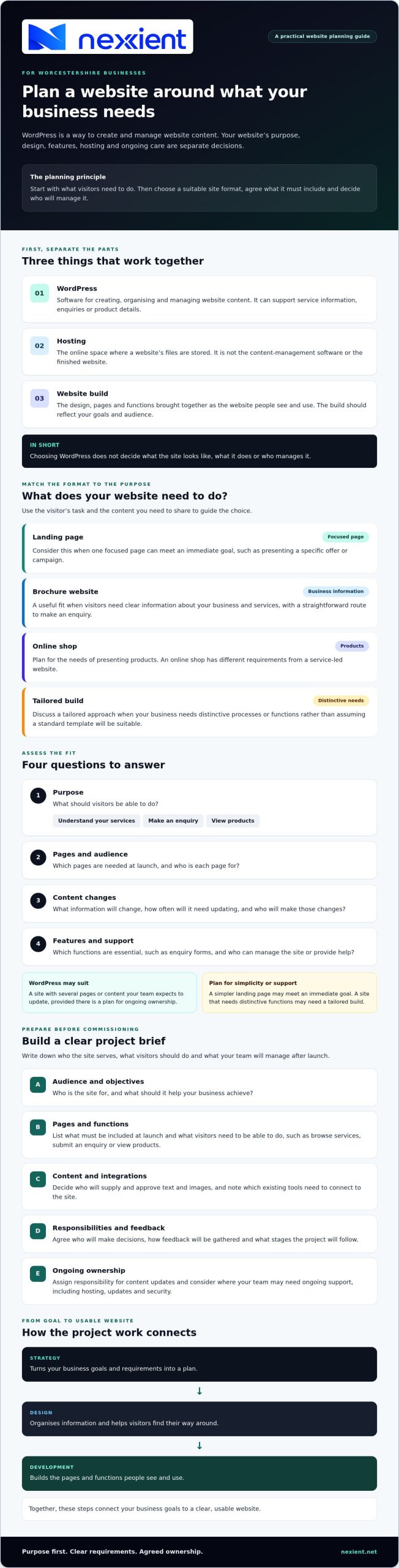
WordPress is the software used to manage website content; hosting is the online space where the site’s files are stored; and the website build brings together its design, pages and functions.
Think of it like a shop. WordPress is the system for arranging and updating what’s inside, hosting is the premises, and the website build is the finished shop, including its layout, signs and fittings. Choosing the system doesn’t determine the site’s content or visual design. Those should reflect your goals, audience and the work put into the build.
Before planning a project, write down what visitors should be able to do, such as read about your services, send an enquiry or view products. Then consider whether you need a brochure website or a different format. This gives a web design and development partner a clearer starting point for planning the site.
How to decide whether WordPress fits your business website
Choose an approach that suits your goals, content and capacity to manage the site. Use these questions to assess whether WordPress is a good fit:
- Purpose: What should visitors do, such as understand your services, make an enquiry or view products?
- Pages and audience: Which pages are needed at launch, and who is each page for?
- Content changes: What information will change, how often will it need updating, and who will make those changes?
- Features and support: What functions are essential, such as enquiry forms, and who can manage the site or provide help?
WordPress may suit a site with several pages or content your team expects to update. However, it still needs planning and ongoing ownership. Consider a simpler landing page if one focused page can meet your immediate goal. A landing page service may suit a specific offer or campaign. A brochure website may work better when visitors need clear information about your services and business. If you need distinctive processes or functions, discuss a tailored build rather than assuming a standard template will meet your requirements.
The WordPress open-source CMS is the official source for information about the software. Use it alongside your own requirements: a platform’s capabilities matter only if they support what your website needs to do.
Which questions should you answer before choosing WordPress?
Turn your assessment into a brief. Name your audiences, list the pages needed at launch, describe what visitors should be able to do and identify essential features. Assign responsibility for content updates, too, and note where your team may need support. If you’re unsure how these requirements translate into a suitable site, discuss your website needs with a web design and development partner.
What to plan when commissioning a custom WordPress website
A clear brief connects your business goals to the site’s design and functions. Before commissioning a custom WordPress website, write down who it needs to serve, what visitors should be able to do and what your team will need to manage after launch.
Include your main audiences and objectives, the pages needed at launch and any essential functions or integrations. For example, note whether visitors need to browse services, submit an enquiry or view products. Decide who will provide and review text and images, and who will update the site’s content later.
Strategy turns these requirements into a plan. Design organises information and helps visitors find their way around. Development builds the pages and functions people see and use. Nexient brings strategic planning, website design and development together to create business websites, rather than selling standalone WordPress software.
What should a WordPress project brief include?
Use this checklist to prepare for a discussion with a prospective partner:
- Audience and objectives: Who is the site for, and what should it help your business achieve?
- Pages and functions: What must be included at launch, and what should visitors be able to do?
- Content and integrations: Who will supply and approve content? Which existing tools need to connect to the site?
- Responsibilities and feedback: Who will make decisions, how will feedback be gathered, and what stages will the project follow?
For additional context on tailored design, read this bespoke web design guide. If you’re planning a website in Worcestershire, you can also discuss your project with Nexient once you’ve outlined your requirements.
Turn your website plans into a clear brief
WordPress is a platform, not a finished website, so start with what your business needs the site to achieve. Match the format and features to your goals, decide who will manage the content, and list the pages and functions you need. A clear brief helps your design and development partner shape the site around your business.
Nexient combines strategic planning with designing how a website looks and works for visitors, then building its pages and features. Its website projects include brochure, eCommerce and landing page sites. If you’re ready to explore an approach for your business in Worcestershire, discuss your website plans with Nexient.
Frequently Asked Questions
What is WordPress used for?
WordPress is used to create and manage website content, from service pages and company information to articles and product pages. A business can use it to explain what it offers, help visitors find key details and encourage enquiries. The functions and appearance depend on how the site is designed and built, so define what visitors need to do before choosing features.
Is WordPress suitable for a small business website?
WordPress can suit a small business if its pages and features match the business’s goals and it has a plan for managing the site. A local Worcestershire firm might need service information and an enquiry route, while another business may need product pages. Nexient creates brochure websites, eCommerce sites and landing pages, helping businesses choose a format that fits their requirements.
Do I need hosting for a WordPress website?
Yes, a WordPress website needs hosting to store its files and make the site available online. WordPress is the content-management software, hosting is the online space, and the website build is the finished design and functionality. Before commissioning work, ask which hosting arrangements are included, who manages them and what responsibilities remain with your business.
Can I build and manage a WordPress website myself?
Yes, you can build and manage a WordPress website yourself, but the time and skills involved depend on the site’s design and features. You’ll need to prepare content, make site changes and organise updates and security. For a straightforward site, self-management may be workable; for a custom design or functions, consider what specialist support your brief requires.