
If you’re wondering why is my website so slow, start by checking more than the part you suspect. Oversized images, hosting, code and external tools can all affect loading. While you investigate, visitors may leave before a page has finished loading.
Start with evidence, not a rebuild. You can make useful first checks without specialist technical knowledge. A methodical diagnosis helps you avoid spending time on the wrong fix. This guide explains how to spot common speed problems, choose practical improvements and recognise when the issue may run deeper than a few quick adjustments. If your checks don’t reveal a clear cause, Nexient designs and develops websites with practical strategy, clean design and considered development.
Key Takeaways
- Wondering why is my website so slow? Hosting, page content, code and external tools can all affect loading.
- Use PageSpeed Insights as a starting point, then compare affected pages and devices to spot patterns.
- Match your next step to the evidence. For example, review large media files, unused features or external scripts.
- If delays affect several pages, look for a shared cause in the website’s structure or features.
Why is my website so slow? Common causes to understand first
A slow website is frustrating, especially when the cause isn’t obvious. Hosting, page content, code and external tools can all contribute, so avoid changing the first thing that looks suspicious. A large image might delay one page, while a slow server response could affect the whole site.
Page speed describes how quickly a page loads and becomes usable. It’s part of broader web performance, which also considers how smoothly a page responds and whether its layout stays stable. Google’s Core Web Vitals measure these experiences: how quickly the main content appears, how promptly the page responds to interactions, and how much the layout shifts as it loads. No single measure tells the whole story.
A brochure website may use visual content to introduce a business, but oversized media adds unnecessary loading work. Good design and development balance the content a page needs with the effort required to deliver it.
Which parts of a webpage can make it load slowly?
Consider both the website and the route between it and the visitor. Large image files take longer to download. Unnecessary scripts, such as code for features you no longer use, can delay content or interaction. Complex features may also require more work from the browser. A hosting server that takes time to respond and a visitor’s slow or unstable connection are other possible sources of delay.
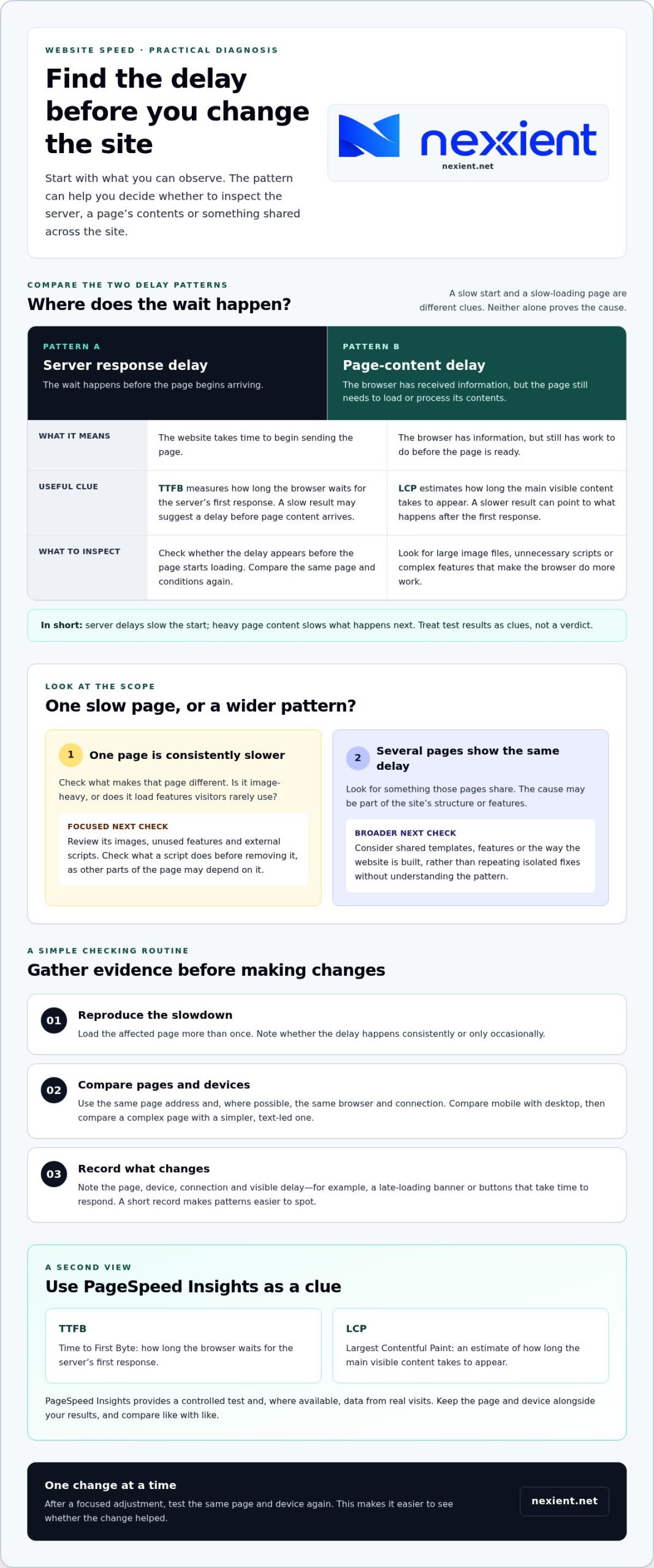
- Server response delay: the website takes time to begin sending the page.
- Page-content delay: the browser has received information but still needs to load or process the page contents.
In short: server delays slow the start, while heavy page content slows what happens next. Noting which pattern you see helps you choose a useful check instead of guessing.
How to find what is slowing your website down
To work out why is my website so slow, look for patterns before changing anything. One test can point towards an issue, but it can’t prove that hosting or code is the cause. Keep comparisons consistent and let the evidence guide your next check.
What should you check before changing anything?
Use the same page address and, where possible, the same browser and connection for each comparison. Note what you tested and what felt slow, such as a late-loading banner or buttons that take time to respond.
- Reproduce the slowdown. Load the affected page more than once. Note whether the delay happens consistently or only occasionally.
- Compare pages and devices. Test the page on mobile and desktop, then compare it with a simpler, text-led page. If the image-heavy page is slower on both devices, inspect its content. If several pages are slow, look for something they share.
- Record what changes. Note the page, device, connection and visible delay. A short record makes patterns easier to spot than relying on memory.
For another view, use Google’s PageSpeed Insights. It provides a controlled test and, where available, data from real visits. Treat the results as clues, not a promised score or a verdict on the cause.
Two terms can help you read the results. Largest Contentful Paint (LCP) estimates how long the main visible content takes to appear. Time to First Byte (TTFB) measures how long the browser waits for the first response from the server. Record both alongside the page and device tested. A slow TTFB may suggest a delay before page content arrives, while a slower LCP can point to what appears afterwards.
If the pattern stays unclear, the results need to be considered alongside the website’s design and development. Nexient designs and develops websites for businesses in Worcestershire and across England. Find out more about brochure website design and development.
What to do next when your website is still slow
Use your test results to choose a focused next step. If one page is consistently slower, check what makes it different. Look at whether its images are larger than needed, whether it loads features visitors rarely use, or whether an external script adds work. An external script is code supplied by another service, such as a booking tool or embedded feed. Before removing one, check what it does, as other parts of the page may depend on it.
Make one change at a time, then test the same page and device again. This makes it easier to see whether the adjustment helped and avoids uncertainty about which change affected loading.
When is a targeted fix enough, and when should the site be reviewed?
A targeted fix makes sense when the evidence points to a contained issue on one page. If the same delay appears across different pages or returns after individual fixes, the cause may sit in shared templates, features or the way the website is built. Review the design and development foundations rather than continuing to apply isolated fixes without understanding the pattern.
A broader review considers how page layouts, content and functionality work together. For businesses in Worcestershire, Nexient brings practical strategy, clean design and considered development to website projects. Landing pages also need a clear balance between persuasive content and the features they load.
If you’re still asking “why is my website so slow?” after checking the evidence, a wider look at your website’s needs can help clarify what deserves attention before you decide on a larger change. Talk to Nexient about your website and the patterns you’ve found.
Make your next website improvement count
A faster website isn’t just a technical goal. It’s part of creating a digital experience that helps visitors find what they need and take the next step. If you’re still asking “why is my website so slow?”, use what you’ve observed to guide improvements, rather than committing to changes without a clear reason.
Nexient works with businesses in Worcestershire and across England, bringing website design, development and practical strategy together. This joined-up approach considers performance alongside the structure and purpose of your site, without assuming the same fix suits every project.
Talk to Nexient about improving your website and take the next step towards a stronger online experience.
Frequently Asked Questions
Why is my website slow on mobile but fast on desktop?
Mobile can feel slower because a page may load different images or features, and a phone may process them differently from a desktop computer. Try another mobile device and note whether the delay happens before the page appears or when you tap a control. If only one page is affected, its mobile layout is a useful place to investigate, although this pattern alone doesn’t prove the cause.
Can large images make a website slow?
Yes, particularly if an image file is much larger than its displayed size. Check the image’s dimensions and file size, then consider resizing or compressing a copy for its place on the page. Keep the original file and check that the revised image still looks clear and serves its purpose. Don’t remove useful images without considering how they support the page.
How can I find out what is slowing my website down?
To understand why is my website so slow, compare your observations with recent changes to the site. If a slowdown began after adding a banner, booking feature or other update, that change is a useful lead. Test the affected page and a page without that change, then use a speed-testing tool to gather more clues. Treat its results as evidence to investigate, not a diagnosis.
Will changing my web host make my website faster?
It may help if the evidence consistently points to a delay before pages begin loading, but changing hosts won’t address every possible bottleneck. Before making a move, identify which pages are affected and whether the delay occurs at the start or later. Also consider the practical work involved in transferring a website, so you can weigh that effort against a more targeted fix.