
When information is scattered across spreadsheets and systems, a web application to streamline business processes could help, but only if it solves a clearly defined problem. Re-entering the same details, chasing updates and working around software that doesn’t match your team’s routine are all signs that a process may need attention.
It’s tempting to jump straight to building something new. But a tailored application is useful only when it supports the way your business actually works.
This guide will help you identify which process to improve first, assess whether your existing tools can do the job, and decide when a bespoke web application may be a better fit. You’ll also learn what to consider when planning a practical solution, from mapping the work to shaping the design and development around it.
Key Takeaways
- Look for duplicated data entry, hand-offs, delays and manual tracking to find where a process is slowing down.
- Compare existing software, configuration or integration, and a bespoke application against the needs of your workflow.
- Consider a web application to streamline business processes when current tools don’t support the work effectively.
- Map the process, agree priorities, shape the user experience and plan development around a clear business outcome.
When can a web application streamline business processes?
A web application is software accessed through a browser, designed to support particular business tasks and the information they rely on. Unlike a general website, it can bring several steps in a workflow into one place. For a broader introduction, see What is a Web Application?
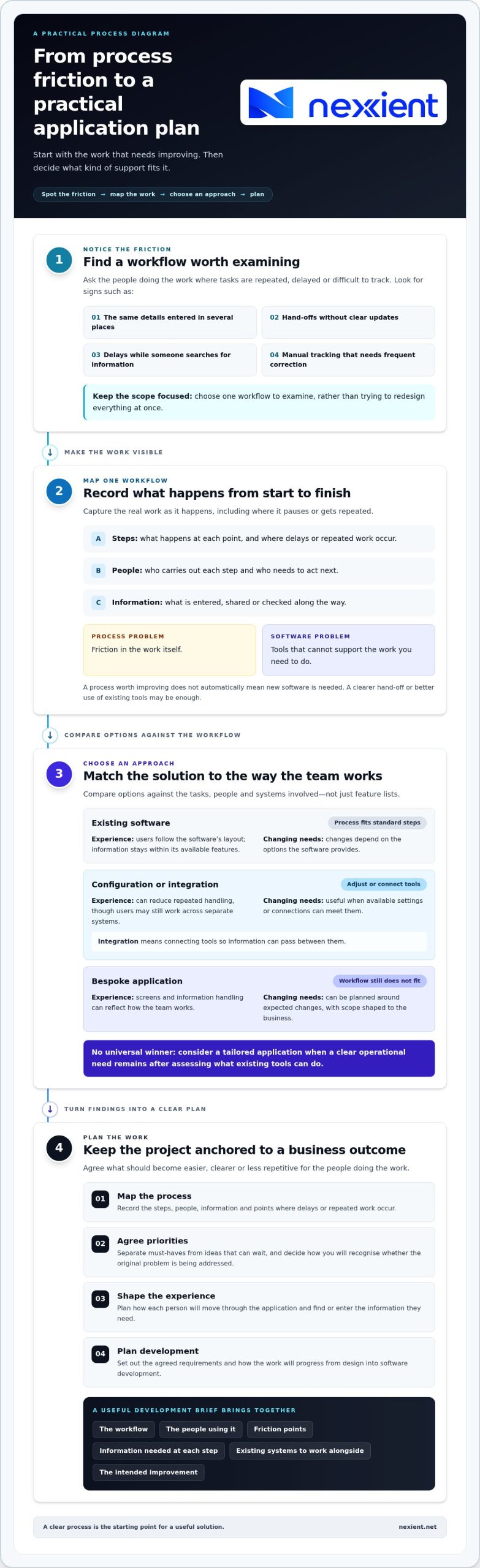
Look for friction in the work itself: staff entering the same details in several places, tasks passing between people without clear updates, delays while someone searches for information, or manual tracking that needs frequent correction. These signs point to a process worth examining, but they don’t automatically mean you need new software. A clearer hand-off or better use of existing tools may be enough.
A web application to streamline business processes is most useful when it addresses a specific problem, such as information being hard to find at a particular stage. Building something simply because it’s new can digitise a confusing process without making it easier.
Which business processes are worth improving first?
Ask the people doing the work where tasks are repeated, delayed or difficult to track. Choose one workflow to examine rather than trying to redesign everything at once. Record:
- The steps from start to finish, including where work pauses or gets repeated.
- Who carries out each step and who needs to act next.
- The information entered, shared or checked along the way.
This gives you a practical view of the work as it happens, not just how it’s supposed to happen. A process problem is friction in the work; a software problem is when the tools can’t support the work you need to do.
Once the process is clear, assess whether a tailored application is appropriate. Nexient designs and develops data-driven web applications around business needs, bringing strategic planning, user experience design and development into the process.
How to compare a bespoke web application with existing tools
Compare the options against the work your team needs to do, not just their feature lists. Existing software may already cover the essentials. Configuration or integration may close a gap. A bespoke application can be shaped around a workflow that still doesn’t fit. Integration means connecting tools so information can pass between them.
| Approach | Workflow fit | User experience and information | Changing needs |
|---|---|---|---|
| Existing software | Works well when your process fits its standard steps. | Users follow the software’s layout; information stays within its available features. | Changes depend on the options the software provides. |
| Configuration or integration | Adjusts settings or connects tools to better support your process. | Can reduce repeated handling, though users may still work across separate systems. | Useful when needs can be met through available settings or connections. |
| Bespoke application | Designed around the specific workflow and its priorities. | Its screens and information handling can reflect how the team works. | Can be planned around expected changes, with scope shaped to the business. |
There’s no universal winner. The right approach depends on the process, the people using it and the systems already in place. Consider a web application to streamline business processes when a clear operational need remains after you’ve assessed what your existing tools can do.
What should you assess before choosing an approach?
Write down the essential tasks, who completes them, where friction occurs and what information moves between steps. Mark each requirement as a must-have or a preference. This keeps the decision grounded in the work and stops optional features from expanding the project. If customer relationship management (CRM) needs are central, this guide to custom CRM versus off-the-shelf options can help frame the comparison.
With your priorities clear, you can discuss a web application project with Nexient and consider an approach shaped around your business.
Plan a web application project with a clear business outcome
Once you’ve chosen a process to improve, turn what you’ve learnt into a clear plan before development begins. Keep the goal practical: what should become easier, clearer or less repetitive for the people doing the work? A specific outcome helps keep decisions focused on the business need rather than a long list of features.
- Map the process. Record the current steps, the people involved, the information they use and where delays or repeated work occur.
- Agree priorities. Separate essential capabilities from ideas that can wait. Decide how you’ll recognise whether the planned solution addresses the original problem.
- Shape the experience. Plan how each person will move through the application and find or enter the information they need.
- Plan development. Set out the agreed requirements and how the work will progress from design into software development.
Turn process insights into a useful development brief
Bring the workflow, users, friction points and intended improvement together in a short brief. Include the information each person needs at each step, as well as any existing systems the application may need to work alongside. This gives planning and design a shared starting point and keeps the team focused on the core need.
Strategic planning connects those operational requirements to the application’s scope. UI/UX design means considering both the interface people use and their experience as they complete tasks. Together, they help shape a solution that’s clear to use, rather than simply transferring an awkward process onto a screen. Nexient’s data-driven web application development brings planning, design and development together. Based in England and serving businesses in Worcestershire, Nexient works with each business’s specific needs rather than assuming every organisation works in the same way.
If you’re weighing up wider automation options, explore this business process automation software guide. To turn your requirements into a practical plan, discuss your web application project with Nexient.
Give your next improvement a clear starting point
A useful next step doesn’t have to be a full specification. Bring together the workflow you want to improve, the people who rely on it and the change that would make their work easier. That gives a project conversation a practical starting point and keeps business value at the centre as the idea develops. Start with one priority, then let real operational needs guide what comes next. If customer relationships and records are central to that workflow, a custom CRM may be worth considering. The right web application to streamline business processes should support the way your team needs to work, not add complexity for its own sake.
Nexient develops custom CRM systems for business needs. Talk with Nexient about your application plans and take a considered next step towards a solution shaped around your work. Start by sharing the workflow you want to improve and the outcome you’re aiming for.
Frequently Asked Questions
Can a web application work with the software a business already uses?
It may be possible to connect a web application with existing software, depending on what those systems support and how information needs to move between them. For example, a sales team might want customer details to pass from a web application into its CRM rather than entering them twice. When scoping a web application to streamline business processes, list the systems involved and the information that needs to pass between them.
Do employees need to install a web application?
Usually, no. Employees access a web application through a browser rather than installing it like a traditional desktop programme. This can make it easier for a team to use the same tool from different computers, provided they have suitable access. Before planning, consider which roles need to use the application and what devices they’ll use for their day-to-day tasks.
How long does it take to develop a web application?
There isn’t one fixed timescale. It depends on the application’s scope, the systems it needs to work with and how quickly requirements and design decisions are agreed. A focused tool with a clearly defined purpose differs from a broader system with more functions. For a Worcestershire project, outline the essential features and priorities early so development planning can reflect the work involved.