
A redesign can improve a website without fixing the reason it isn’t working. The right website redesign process checklist starts with clear goals, not a fresh look: it helps you decide what needs to change and what should stay.
A successful redesign involves more than design and development. Review current pages, prepare content, plan redirects and test the new site before launch. This guide explains when to redesign, what the process involves and when content should be ready. It also covers DNS, the system that directs your domain to your website, and how to plan a rollback if launch issues arise. Use the checklist to move from early decisions to launch with fewer surprises and a clearer path to your goals.
Key Takeaways
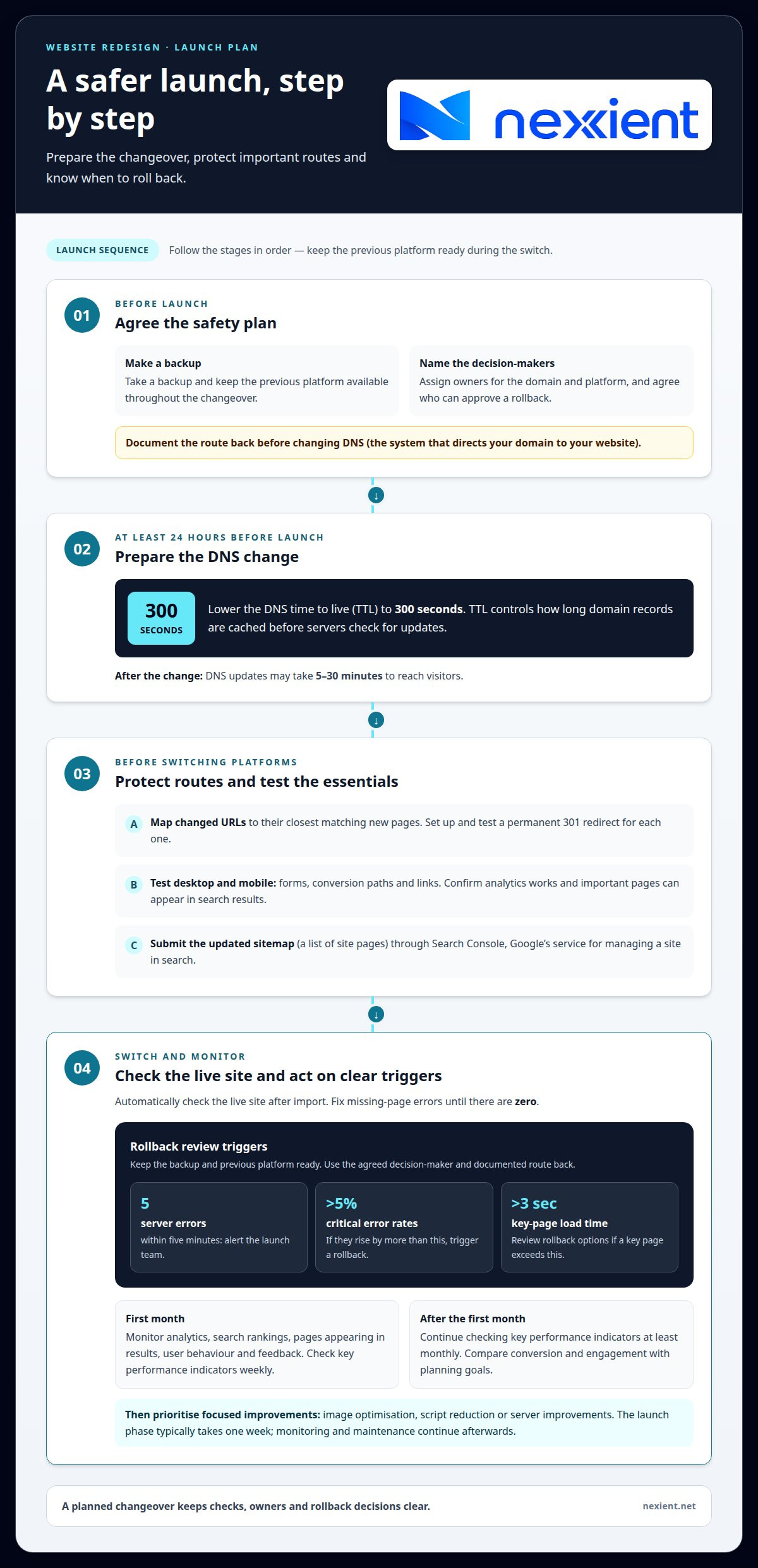
- Set launch checks for forms, links, analytics and redirects, and agree how to roll back before changing DNS.
- Lower the DNS TTL (how long servers keep domain information before checking for updates) to 300 seconds at least 24 hours before launch to prepare for the changeover.
- Audit existing pages and define page goals, key messages and content hierarchy before detailed visual design begins.
- Choose a redesign when deeper structural or user-experience problems need attention; use website maintenance to support ongoing improvements after launch.
Launch planning, DNS changes and rollback procedures
Before launch, take a backup and agree who can approve a rollback. A website redesign process checklist should assign owners for the domain, platform and launch decisions. Reduce the DNS (Domain Name System) time to live, which controls how long domain records are cached, to 300 seconds at least 24 hours before launch. After the change, updates may take 5-30 minutes to reach visitors, so keep the previous platform available during the switch.
How should you manage URL redirects and prevent traffic loss during a redesign? Map each changed URL to its closest matching new page, then use a permanent redirect (a 301 redirect) so visitors and search engines reach the right destination. Test each redirect and make sure important pages can appear in search results.
What website redesign testing and launch checklist should teams follow? Before switching platforms, test forms and conversion paths on desktop and mobile, check links, confirm analytics, and check that search engines can include pages in results. Submit the updated sitemap (a list of site pages) through Search Console (Google’s service for managing a site in search), then automatically check the live site after import and fix any missing-page errors until there are zero.
Set clear monitoring triggers for the launch team. For example, alert when the site reports five server errors within five minutes; trigger a rollback if critical error rates rise by more than 5%. Review rollback options if key-page load times exceed 3 seconds. Keep the backup and previous platform ready, with a named decision-maker and a documented route back.
Monitor analytics, search rankings, whether pages are added to search results, user behaviour and feedback during the first few weeks. Check key performance indicators (measures of performance) weekly for the first month, then at least monthly. Use the website redesign process checklist to compare conversion and engagement with planning goals, then prioritise focused improvements such as image optimisation, script reduction or server improvements. The launch phase typically takes one week, but monitoring and maintenance continue afterwards.
Should content be prepared before design?
Yes. Set page goals, key messages and approximate copy volume before detailed visual design begins. This gives wireframes, or simple page-layout plans, a clear structure to follow. Map user journeys and draft the sitemap first, so navigation supports business goals and helps visitors find the next step. For example, an enquiry page should make its main action obvious.
Start with a content audit. Inventory existing URLs, then identify pages that attract traffic, outdated information and gaps in your content. Review analytics alongside page content to assess performance against business goals. A technical audit should also check crawling errors, mobile usability, loading speed, indexed pages, page information for search engines and existing redirects.
Use the audit to decide what to keep, revise, combine or remove. Map every retained page to the new structure, and plan redirects for changed URLs. This preserves useful routes for visitors and search engines. Check keyword performance and the value of links from other websites when prioritising pages, since both can inform migration decisions.
Prepare copy and media before development: refine service descriptions, gather approved images and organise brand assets such as logos. Give each key page one clear action, such as sending an enquiry. Define a unique search-result title, a short summary for search results, main heading and relevant internal links for each page. This content hierarchy lets designers build visual elements around real material rather than placeholders.
Bring the audit, wireframes and content plan together in the project timeline. If you need help shaping those priorities, talk through your redesign plan.
Reasons to redesign a website
A visual update alone won’t fix a website with confusing structure or navigation. Optimisation may be a better fit when the structure works and targeted changes can address the problem. Consider a redesign when users struggle to find information, key journeys break down, or the site no longer reflects your business strategy. Start by matching each issue to a business goal, such as making service enquiries clearer.
Check the evidence before committing. Compare analytics for important pages, traffic sources and conversion paths, then review feedback for recurring problems. A first impression can form in under 50 milliseconds, so outdated messaging or inconsistent visual elements may weaken trust quickly. If mobile layouts make forms difficult to use, test the journey on a phone before deciding which parts need changing.
Performance can also signal when a deeper update is needed. More than 60% of web traffic comes from mobile devices, making mobile usability a practical priority. A page taking more than three seconds to load risks losing a significant portion of its audience. Identify whether the cause is isolated, such as oversized images, or tied to the wider platform and site structure. Fix local issues where possible; redesign when multiple core elements need rebuilding.
For a UK redesign, check how you collect personal data against UK GDPR, the UK rules for protecting people’s personal information, and review how you use cookies. Build accessibility into page structure and controls, using WCAG 2.2, guidance for making websites accessible to disabled people, as the design benchmark identified for this checklist. Treat these as planning checks, not a substitute for assessing the site’s specific legal needs.
Define success before work begins: record the problem, the intended user change and how you’ll measure it. If a redesign aligns with your goals, discuss your website plans.
Nexient: Website Maintenance
Nexient’s Website Maintenance can support you after launch, when your redesigned site needs ongoing attention. It provides a way to manage updates and address changing website needs without treating launch as the finish line.
Consider this next step if your team needs to keep content current, respond to issues or plan improvements as you review site performance. For a larger change, such as a new business website, eCommerce website or landing page, align the project with the goals and user needs identified during redesign planning.
Bring your priorities and questions together, then decide what ongoing support makes sense for your site. Contact Nexient to discuss your website needs.
Put your next digital step in motion
A redesign is most valuable when it gives your organisation a clearer way to serve customers and support future growth. Treat your website redesign process checklist as a working plan, not a document to file away. Use it to agree what matters most, who owns each decision and how the site should evolve after launch.
Nexient offers Business Websites, eCommerce Websites and Landing Pages to support different digital needs. Choose the format that fits your audience and how you want them to engage. A focused brief gives the project a strong starting point and keeps decisions connected to your priorities.
Ready to shape your next website project? Contact Nexient to discuss your redesign. A clear next step can turn your plans into a more purposeful digital experience.
Frequently Asked Questions
What Does a Website Redesign Typically Involve?
A website redesign typically combines planning, content decisions, visual design, development and quality checks. It may also involve agreeing who approves key decisions, how existing integrations will work and which features belong in the new scope. For example, an online shop’s product information and checkout journey need consideration alongside page design.
What needs to happen on launch day?
On launch day, coordinate the people responsible for the domain, website platform and business approvals. Confirm the latest approved version is ready, agree when the domain change will happen, and establish a clear way to report issues. Once the new site is live, test key journeys from a visitor’s perspective, including enquiry confirmations or a completed purchase.
What should you check during design and build?
Check that page designs work at different screen sizes and that visitors can use menus, buttons and forms with a keyboard. During development, test important features in the browsers your audience uses. For an online shop, walk through a sample purchase; for an enquiry site, confirm each form clearly indicates when it has been submitted.
What should you do before the redesign starts?
Before work begins, agree the project scope, who makes decisions and how feedback will be gathered. Arrange access to essential accounts, such as your domain registrar and analytics platform, so the team can plan the transition. Identify connected tools, such as a booking system or email platform, that the redesigned site must continue to support.
Will a redesign hurt my Google rankings?
A redesign can affect search visibility if useful pages disappear, page topics change or search engines encounter broken links. Keep valuable content and page purpose consistent where possible, and map changed addresses to relevant replacements. After launch, compare search impressions, clicks and indexed pages with your earlier baseline to spot changes and investigate affected pages promptly.