
AI-only Web Builders can suit a straightforward site you need to launch quickly, but they are not automatically the best choice for a growing business. The right option depends on the control, flexibility and functionality your Worcestershire business needs.
A quick start can be appealing, especially when a builder generates a first draft and includes useful tools. This comparison explains where AI-only builders work well, how built-in features differ from third-party integrations, and what free plans and trials allow you to test. You’ll also learn when a custom-designed website may be a better fit, helping you choose an approach that supports your business now and as it grows.
Key Takeaways
- Use an AI-built draft as a starting point, then assess whether its template and editing options can reflect your firm’s identity.
- List the tools your website needs to connect with, and compare those integrations with the features included in the builder.
- Use a free plan or trial to test the editor and key functions before deciding whether the platform fits your needs.
- Choose custom design when your goals call for more tailored layouts, functionality or room to grow.
AI-Only Website Builders: Are They Worth Using Yet?
AI-only Web Builders can produce a first draft quickly, but the result still needs your judgement. Their value depends on whether the templates, features and customisation options suit your business. For a Worcestershire firm, treat the generated design as a starting point, not a finished strategy.
Website Templates and Customisation
A template gives you a visual starting point for pages such as Home, Services and Contact. Choose one that suits your content, then customise its colours, images, wording and layout to make it distinctive. Check how easily you can rearrange sections and adapt the mobile version. If your preferred design requires workarounds, the template may limit your options. Compare Web Builders by testing these edits, not just browsing template galleries.
No-Code Website Creation Steps
A no-code builder lets you create pages using menus and visual controls instead of writing code. Choose a template, then add your text, images and page structure. Connect a domain, configure forms and other required features, and review the site on mobile and desktop. Before publishing, test every page, link and form, and make sure your marketing content is clear. AI-only Web Builders can speed up the process, but review every generated detail before launch.
A website builder combines an editor, hosting and tools for creating and publishing pages. Choose a design, add content and configure features within one platform.
For beginners and small firms, Wix and Squarespace offer visual editing. Compare their templates and controls with your requirements. Shopify suits businesses focused on online selling. WordPress.com offers a different approach, while Webflow provides more visual design control.
For UK ecommerce, Shopify is a focused option. Wix and Squarespace can also suit shops that need broader website features. Compare product management, payment options and integrations before choosing.
Plan for GDPR by explaining how you use personal data, and make cookie tracking clear with suitable controls. According to the Scottish Government, websites must include an accessibility statement.
Common limitations include similar-looking templates, restricted customisation and reliance on one platform. Test integrations and review how you could move your domain and content before committing.
Built-in features and third-party integrations
Start with the tasks your site must handle, then separate essential tools from useful extras. A builder might combine editing, hosting, forms and publishing in one dashboard. This can simplify maintenance, but it doesn’t guarantee that every feature suits your workflow. A portfolio site, for example, may need image galleries and enquiry forms, while a campaign page may need a form connected to email marketing.
Review the editor’s built-in features before adding third-party services. Check whether you can manage contact forms, page titles, image galleries and basic visitor reporting in one place. Then test the process: edit a page, preview it and publish a change. If each step is intuitive, your team can make routine updates without switching between several tools.
Integrations connect a builder to external platforms. Depending on the service and setup, a Google connection might support visitor measurement or business listings. Before choosing, list the platforms you already use, such as email marketing or appointment booking. Search the builder’s integration directory and check that each connection passes the information you need, rather than relying on a logo alone.
Consider how your needs may change. Templates and built-in tools can provide a strong starting point, but a business with a distinctive sales process may need a custom connection. If standard forms can’t capture the right information, a custom CRM system may be more suitable than adding disconnected apps.
Finally, compare the full workflow, not just the feature list. Test one real task, such as collecting an enquiry, recording it and sending a follow-up. Confirm who can access the information and how updates are handled. A conversation about your website requirements can help clarify which functions belong in the site and which need a separate system.
Free plans and free trials
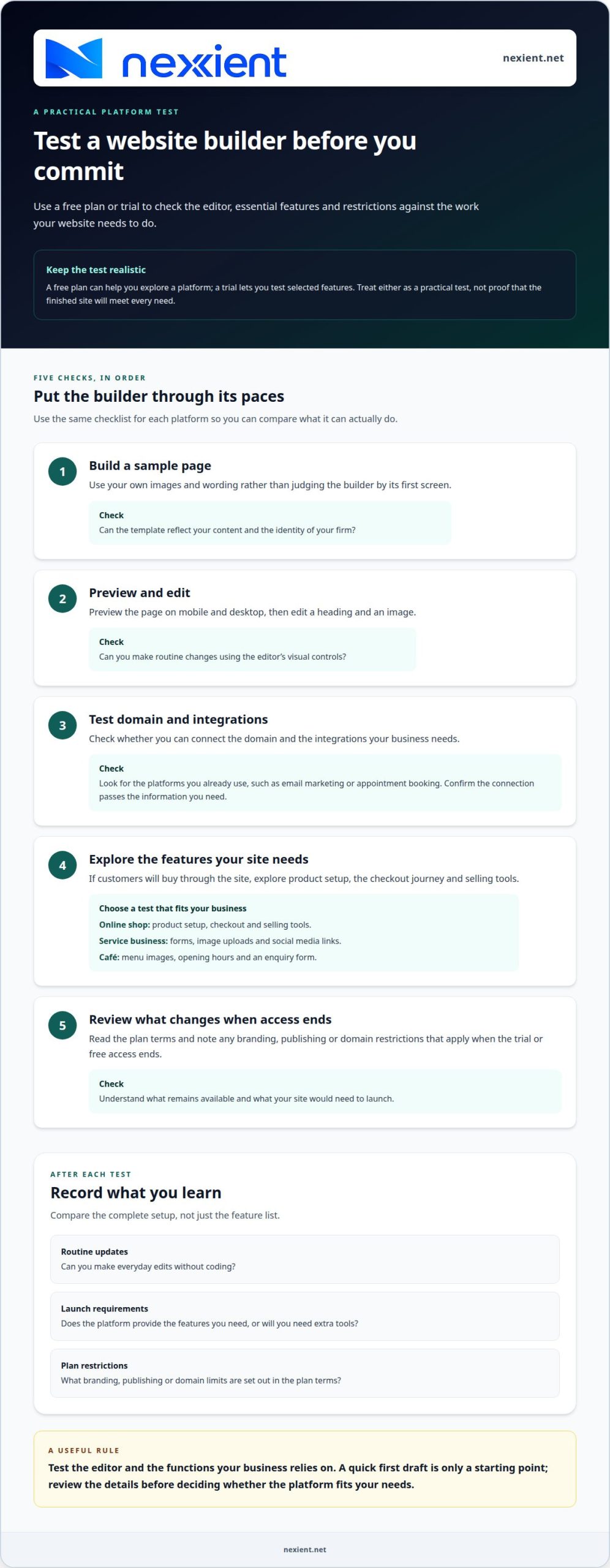
A free plan can help you explore a platform before committing, while a trial lets you test selected features. Treat either as a practical test, not proof that the finished site will meet every need. For a Worcestershire café, for example, check whether you can add menu images, publish opening hours and connect an enquiry form.
Use the same checklist for each platform to make the comparison useful. Test editing on a computer and phone, then check the functions your business relies on. For an online shop, explore product setup, the checkout journey and selling tools. For a service business, test forms, image uploads and social media links.
- Build a sample page using your own images and wording.
- Preview it on mobile and desktop, then edit a heading and image.
- Test whether you can connect the domain and integrations you need.
- Explore commerce features if customers will buy through the site.
- Review what changes when the trial or free access ends.
Record what each test reveals. Can you make routine updates without coding? Does the platform provide the features you need to launch, or will you need extra tools? Note any branding, publishing or domain restrictions in the plan terms. This lets you compare the complete setup, rather than judging a builder by its first screen.
Before choosing, make a short list of essential features and test each one in the editor. If you’re weighing a trial against a more tailored website, discuss your website requirements and identify the right next step.
Nexient: Business Websites
Nexient creates Business Websites for firms that need a website shaped around their goals, content and customers. If templates feel restrictive or your site needs a more tailored structure, explore Business Websites designed for your organisation.
For online selling, eCommerce Websites offer a way to present products and support customer purchases. Landing Pages can focus attention on a specific campaign, while Charity Websites can showcase an organisation’s work and purpose. The right format depends on what visitors need to do and what your website must support.
Contact Nexient to discuss a website designed around your Worcestershire business or organisation.
Choose a website that moves your business forward
The right choice should support more than the launch. Consider what you want visitors to do next, how your team will manage the site and whether your plans may change. This gives you a practical way to weigh web builders against a more tailored design, based on your priorities rather than the latest feature list.
Write down your main goal, essential functions and the experience you want customers to have. Use those priorities to shape a website that feels clear, useful and ready to grow with your Worcestershire firm. Nexient can help turn that direction into a considered digital experience.
Contact Nexient about your website and take the next step with confidence.
Frequently Asked Questions
Can I keep improving my website after launch?
Yes, you can refine a live website as your business changes. Add a service page when your offer expands, update staff details when roles change, and review enquiry forms if customers find them difficult to complete. Set a regular review reminder and keep a short list of changes, so improvements stay focused on visitor needs and business goals.
Can I switch website builders if I change my mind?
Yes, but moving platforms can involve more than transferring text. You may need to recreate page layouts, upload images again and reconnect forms or other tools. Before switching, save copies of your content and images, list the pages that attract enquiries, and map their addresses to the new site. This helps preserve useful content and prevent broken links.
How much do website builders cost in the UK, including domain and hosting fees?
The total depends on the platform’s plan, the features you need, and whether domain registration and hosting are included or charged separately. Online selling, extra integrations and business email can affect the overall cost. Compare renewal terms as well as introductory offers, and check whether the domain renews through the builder or a separate registrar.
How do I choose a website builder and build a website step by step?
Start with your main goal, such as generating enquiries or selling products, then list the functions you need. Compare platforms against that list and test the editor with a sample page. Organise your content, build the essential pages, connect your domain, and test forms and links on mobile and desktop before publishing.
Can I use my own domain and move a website to another builder later?
Yes, you can use a domain you own, but the process depends on where it’s registered and how the new platform connects it. Keep access to your domain account and note its renewal date. If you change builders, update the domain settings only when the new site is ready, then test that visitors reach the correct pages.