
Stock control shouldn’t force your team to work around software. A custom web app for inventory management can bring stock levels, product movements and location details into one view, while supporting the tasks your operation relies on, from receiving and dispatching goods to stock checks. It can also use relevant fields, alerts and reports, helping your team act on useful information instead of sorting through data they don’t need.
If spreadsheets or generic systems make it harder to see what needs attention, adding more fields alone won’t solve the problem. Start with how your business receives, stores and moves stock. This guide explains what an inventory management app does, how to plan custom fields and alerts, and how reports can support practical decisions. It also covers how a tailored app can reduce manual work and grow with your business, and how to shape one around the way your team operates.
Key Takeaways
- Map how stock is received, picked and moved between locations before shaping the app’s workflows.
- Set reorder points and choose who should receive low-stock alerts, so teams can act before items run short.
- Select fields and reports that help reveal stock trends, sales performance and warehouse efficiency.
- Consider how shared inventory data, useful integrations and mobile access could support your team as the business grows.
What is an Inventory Management App?
Choose a UK developer who can map your workflows, plan integrations and test the app in practice. Involve the staff who receive, move and count stock.
Track stock across multiple locations
Set up each warehouse, shop or storage area as a separate location in the inventory system. Record product quantities and locations in one database, then log transfers between sites. Make sure staff can distinguish available stock from stock in transit. This helps prevent a transfer from being counted as new stock at both locations.
Monitor real-time stock levels
Record each receipt, sale, return and adjustment as it happens so staff can see current stock levels. Choose a platform that displays quantities clearly and keeps a record of changes. For UK VAT, configure product and transaction records to support accounting and VAT reporting. Protect personal data by limiting access and securing the information the app stores.
Automate stock inflows and outflows
Connect goods-in and goods-out steps to the records they update. For example, receiving a purchase order should add verified quantities, while dispatching an order should reduce available stock. Decide who can correct errors and keep a record of each adjustment. Traditional app development can take at least six to eight months for initial development, so plan workflows early.
Set low-stock alerts and reordering
Set a reorder point for each product based on how quickly it sells and how long replenishment takes. When stock reaches that level, alert the person responsible for purchase orders. The app can prepare a reorder for review, while staff verify quantities and suppliers before approving it. Use stock reports to spot recurring shortages and adjust reorder points.
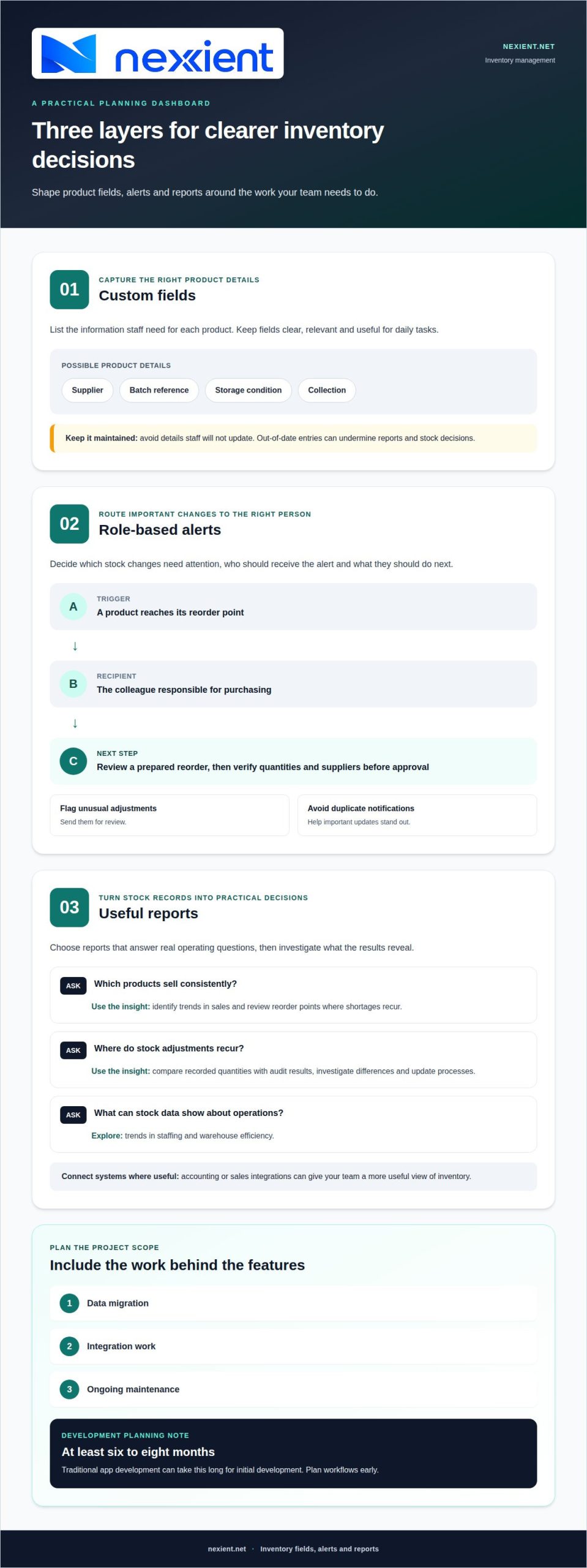
Custom fields, alerts and reports
Plan the product fields, role-based alerts, reports and integrations the app needs. Include data migration, integration work and ongoing maintenance in the project scope. Clear requirements from the outset can help prevent avoidable work later.
Define custom inventory fields
List the details your team needs for each product, then create fields to capture them. A product catalogue might include supplier, batch reference, storage condition or collection, alongside standard product information. Keep fields clear and relevant to daily tasks. Avoid collecting details staff won’t update, as out-of-date entries can undermine reports and stock decisions.
Configure inventory alerts
Decide which changes warrant an alert and who needs to act. For example, notify a purchasing colleague when a product reaches its reorder point, or flag an unusual adjustment for review. Give each alert a clear next step, such as placing a purchase order or investigating a stock count. Avoid duplicate notifications that can make important updates easier to miss.
Analyse inventory reports
Choose reports that answer practical questions, such as which products sell consistently or where stock adjustments recur. Inventory analytics can help identify trends in sales, staffing and warehouse efficiency. Compare recorded quantities with audit results, investigate discrepancies and update processes. Connect accounting or sales systems where an integration gives your team a more useful view of inventory.
A custom inventory web app can track the data points your business needs and provide tailored alerts and reports. It can also record stock transfers between locations, creating a clear audit trail.
Benefits of building a custom inventory app
Map your workflows and goals first, then shape a custom web app for inventory management around them. Before launch, test realistic stock scenarios, including migrating existing records and checking that staff can complete their tasks.
- Bring records together. Use a central management system to reduce discrepancies between spreadsheets and paperwork. For example, staff checking a product’s availability can work from the same updated record, rather than reconciling separate files. This gives teams a shared view of stock and its movement.
- Connect essential systems. Identify where inventory data needs to flow, such as between an ecommerce platform and accounting software. A connection can reduce repeated manual entry, but map which system owns each record first. Clear rules help prevent conflicting product or order updates.
- Support work on the move. Make the application responsive so staff can view inventory information on a smartphone. Consider a warehouse task: a colleague needs to check a product record away from a desk. Design screens around that action, with key details easy to find and update.
- Make room for growth. A custom web app for inventory management can accommodate new workflows, features and integrations as operations change. Start with core processes, then prioritise additions against real business needs. This avoids building complexity before teams can identify its value.
- Compare investment with operational value. Custom development has an initial cost, while potential savings may come from improved inventory management, lower carrying costs and less manual labour. Track measures such as time spent correcting records and stock discrepancies to assess whether the application is helping.
Map the workflows, systems and outcomes your project needs with a digital application team.
Nexient: Business Websites
Nexient builds tailored Business Websites to help businesses present a clear online presence. If your inventory system supports internal operations, a business website can help customers understand what you offer, while an eCommerce Website can present products for online sales.
Consider how your public-facing website and inventory processes should work together. For example, an eCommerce product catalogue may need to align with the stock information your team manages internally. Map these requirements before planning either project, so each digital tool has a defined role and supports a consistent customer experience.
Explore Business Website design to see how a polished online presence can support your next stage. Contact Nexient to discuss your website goals.
Turn your inventory plan into a practical next step
Before committing to a build, appoint a project lead and gather input from the staff who will use the app. Ask which decisions they make during a typical shift, then prioritise the functions that support those decisions. This gives development a clear starting point and keeps future additions focused on genuine operational needs.
A custom web app for inventory management should fit how your business works today and leave room for processes to change. Set a review point after launch and use staff feedback to guide improvements. This helps the app evolve alongside your operation rather than relying on assumptions made at the outset.
Ready to define your next step? Discuss your inventory app with Nexient and start shaping a practical plan for growth.
Choose a development partner who can turn staff insights about day-to-day decisions into clear priorities for the app. Look for an approach that fits current workflows, can accommodate changing processes and uses staff feedback after launch to guide improvements.
Frequently Asked Questions
Custom inventory management app vs off-the-shelf software: which is better?
A custom app may suit a business whose stock processes don’t fit standard software. Off-the-shelf tools can work well when their features meet your needs. Compare the workflows that matter to you, such as handling product variants or approval steps, against each option. Consider how easily your team can maintain product records and adapt processes as operations change.
What integrations should an inventory web app support, such as accounting, ecommerce and barcode scanners?
Choose integrations based on where product and order information already lives. Connecting eCommerce and accounting systems can reduce duplicate entry, while barcode scanning can speed up item identification during stock checks. Before planning an integration, map which system creates each record and how updates should flow. This can help prevent mismatched product codes or orders appearing differently across platforms.
How should a custom inventory app handle multi-warehouse stock, transfers and reorder alerts?
Keep each warehouse’s quantities distinct, and record transfers with a clear origin, destination and status. For example, mark stock as in transit until the receiving site records its arrival, rather than counting it as available at both locations. Set reorder alerts against the stock available at the relevant site, so surplus stock elsewhere doesn’t hide a local shortage.