
Would another CRM tidy up your customer data, or give you one more system to manage? If information is scattered across spreadsheets, inboxes and separate tools, or your team’s processes don’t fit standard workflows, custom CRM development could be worth exploring. Start with the everyday friction your team needs to remove, not a long list of features.
This guide explains how to assess whether a bespoke CRM suits your business, scope it around real workflows and prepare for development. Nexient designs and develops custom CRM systems for businesses, including those in Worcestershire. Before discussing a project, map the steps your team follows, who handles them and what information or tools the system needs to work with.
Key Takeaways
- Repeated admin and workarounds can point to a process-fit problem, not just a need for another tool.
- Custom CRM development is easier to scope when you map workflows and users before choosing features.
- Separate essential functions from future ideas to keep the first version focused on your priorities.
- Bring your current processes, user needs and desired workflows to an early conversation with Nexient.
When does custom CRM development make sense for a business?
Custom CRM development means creating a customer relationship management system around the way your business works and the information it needs. A CRM organises customer interactions and records. A tailored system is most useful when standard workflows repeatedly clash with how your team manages enquiries, sales or ongoing relationships. The goal is to fit the process, not simply commission a different-looking interface.
Trace a typical customer journey from first contact to follow-up. Are details split between spreadsheets and inboxes? Does someone enter the same information more than once, or pass updates manually because teams don’t share a clear view? These patterns may signal a process-fit problem. A preference for different colours, page layouts or menu positions is less compelling on its own, as configuration may be enough. For more on what CRM includes, see Customer Relationship Management (CRM).
Focus on friction that affects important work, such as a handover that regularly loses context or records that need repeated correction. If the issue comes from how your business operates, a custom business system can be designed around those processes and information needs.
How can you tell when a standard CRM no longer fits?
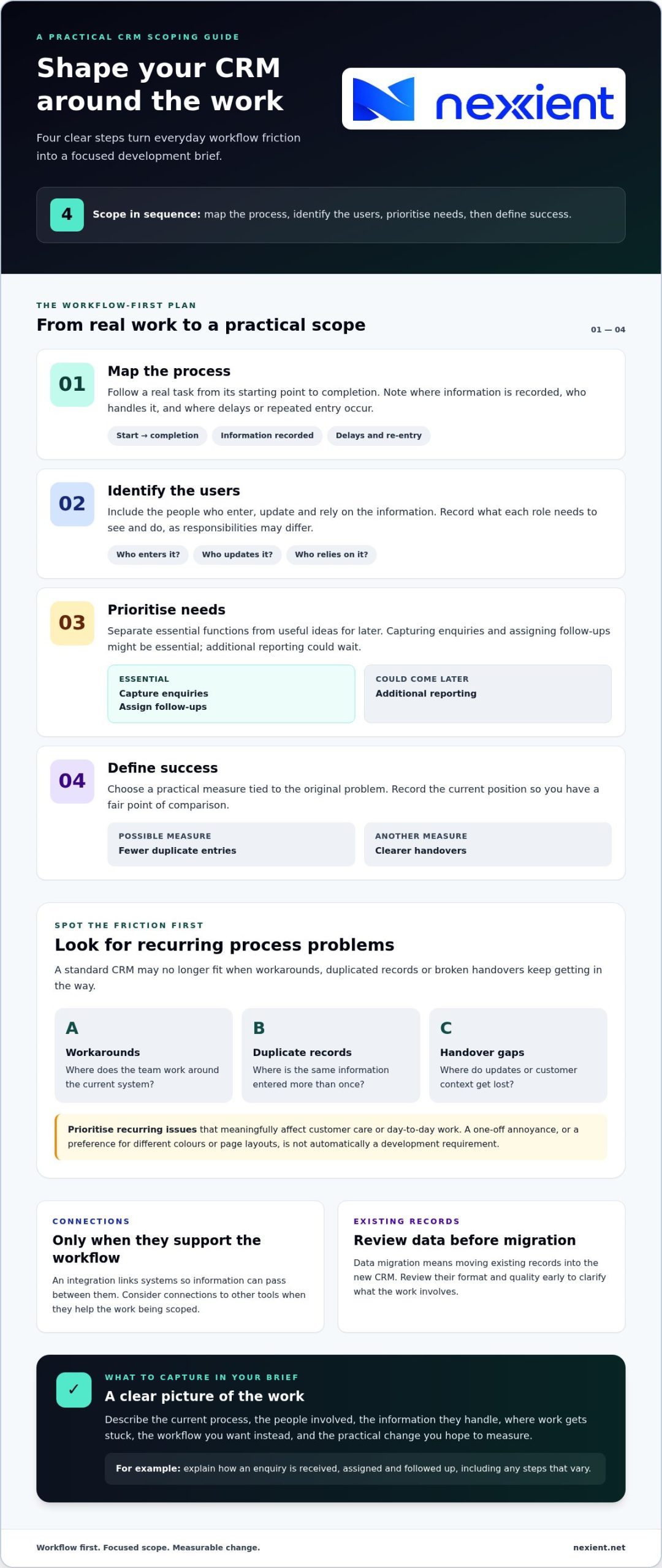
Run a simple diagnostic. Note where workarounds happen, where records are duplicated and where handovers break down. For each issue, record how often it occurs, who it affects and what work it disrupts. A one-off annoyance shouldn’t automatically become a development requirement. Prioritise recurring problems that have a meaningful effect on customer care or day-to-day work. For a fuller comparison of the options, see Custom CRM vs Off-the-Shelf: The Definitive 2026 Decision Guide.
How to scope custom CRM development around your workflows
A clear scope turns custom CRM development from a collection of ideas into a practical plan. Begin with the work your team needs the system to support. Then decide what belongs in the first version and how you’ll judge whether it is helping.
- Map the process. Follow a real task from its starting point to completion. Note where information is recorded, who handles it and where delays or repeated entry occur.
- Identify the users. Include the people who enter, update and rely on the information. Record what each role needs to see and do, as responsibilities may differ.
- Prioritise needs. Separate essential functions from useful ideas for later. Capturing enquiries and assigning follow-ups might be essential, while additional reporting could wait.
- Define success. Choose a practical measure tied to the original problem, such as fewer duplicate entries or clearer handovers. Record the current position so you have a fair point of comparison.
Consider connections to other tools only when they support the workflow. An integration links systems so information can pass between them. Data migration means moving existing records into the new CRM. Reviewing the format and quality of those records early helps clarify what the work involves.
What should a custom CRM development brief include?
Bring a clear account of your current process, the people involved, the information they handle and the points where work regularly gets stuck. Add the workflow you want instead and the practical change you hope to measure. For example, describe how an enquiry is received, assigned and followed up, including any steps that vary. This gives Nexient a grounded starting point for discussing custom systems development and shaping requirements around real work.
These notes can help you discuss your CRM brief with Nexient and set priorities before the scope takes shape.
Custom CRM development in Worcestershire: from brief to next steps
For a Worcestershire business, a useful CRM project starts with how people actually work, not a template of features. Nexient brings strategic planning, design and development together to create custom CRM systems around business needs. Early collaboration helps establish which workflows matter, who will use the CRM and what the system needs to support. Those priorities then guide its design and development.
This approach connects the brief to the experience of using the system. Nexient’s work on data-driven web applications also brings information and business processes together in digital tools. The project’s requirements should guide its scope, so each function has a clear purpose.
What happens in an initial custom CRM conversation?
Bring a practical picture of the work: how a process runs today, where it creates friction and what you’d like to improve. You don’t need a polished specification. A real example, such as how an enquiry moves from first contact to follow-up, makes the discussion more concrete.
- Your current process and the people involved
- The main points where information or handovers cause difficulty
- The outcomes you want to assess, such as clearer ownership of follow-ups
This context helps clarify priorities and identify a suitable next step for your custom CRM development project. It also gives you a clearer basis for discussing what the system should do and how the work could be shaped around your business.
Learn more about discussing a custom CRM project with Nexient.
Turn your CRM brief into a clear next step
A CRM project doesn’t need to begin with every future feature decided. Start with one useful question: what should become easier for your team? A specific answer gives the next conversation direction and helps keep decisions connected to the work the system needs to support.
For custom CRM development, Nexient combines strategic planning, user experience and interface design, and development. The company develops custom CRM systems and data-driven web applications, so your brief can become the starting point for a digital solution shaped around your business rather than assumptions about how it should operate.
Gather your notes and involve the people closest to the process. Discuss your CRM project with Nexient to define a practical next step towards a system designed around your business.
Frequently Asked Questions
Is custom CRM development suitable for a small business?
Yes. A small business can benefit if its processes need more than a standard CRM can reasonably accommodate. Size alone isn’t the deciding factor; the fit between the tool and the work matters. For example, a Worcestershire firm with a distinct quoting and approval process could consider a custom CRM, then weigh the recurring impact of the problem against the work involved in a tailored system.
How long does custom CRM development take?
There isn’t one reliable timescale for every project. The scope, condition of existing records, connections to other tools and time needed to make decisions all affect the work involved. A focused system for one workflow differs from a wider operational platform. Before discussing timing, define the essential tasks for the first release and identify any other tasks or systems the project depends on.
Can a custom CRM work with the systems a business already uses?
It may be possible, depending on the systems and how information needs to move between them. List the tools your team relies on, what information each holds and where you currently re-enter details. For example, decide whether an enquiry needs to pass from your website into the CRM, or whether staff only need a clear link to the source record.
What information should I prepare before discussing a custom CRM?
Bring a real example of a customer journey, such as an enquiry that became a quote, and note any exceptions that complicate the usual route. A sample form or list of the fields your team records can make requirements more tangible. Also identify who will approve priorities and which existing tools or records the project may need to account for.