
A website can look polished and still be costing you enquiries. The clearest signs you need a new website in 2026 include a mobile experience that’s difficult to use, slow pages, outdated content or branding, and a steady fall in enquiries or conversions. If three or more of these problems apply, it’s time to look beyond quick fixes and assess whether a redesign is the better route.
It’s understandable to hesitate before taking on a redesign, especially if you’re unsure whether the problem is the website or something else. This guide will help you assess how your site works on a phone, whether its design and content still serve your business, and what your enquiry trends are telling you. You’ll also find practical checks to help distinguish a fixable issue from a website that’s holding your business back.
Key Takeaways
- Try completing key tasks on your website using a phone, and note where navigation, forms or buttons create friction.
- Judge a redesign by whether the site still supports your business goals, not by its age alone.
- Compare enquiry and conversion trends across matching periods to spot changes that may point to a website problem.
- When small fixes no longer address the underlying issues, consider whether a new business website would provide a clearer, more effective foundation.
1. Mobile responsiveness
More than 70% of UK web traffic comes from mobile, so a desktop-only experience can shut out much of your audience. A responsive website adapts its layout to different screen sizes, keeping text readable and buttons usable without sideways scrolling. If visitors must zoom in to read your services or struggle to reach the contact form, your web design is creating friction.
To check whether your website works well on mobile, open it on a phone and complete a key task, such as finding a service and submitting an enquiry. Check that menus, forms and calls to action work with touch, text is easy to read, and important content fits the screen.
Test mobile loading speed as well. Pages that take more than three seconds to load risk losing visitors before they see your offer. Run key pages through Google PageSpeed Insights on mobile, then review the recommendations alongside the score. A low score can help identify performance problems, but it isn’t a redesign decision on its own. Large images, unnecessary scripts or hosting can affect speed, and targeted fixes may be enough.
Google’s Core Web Vitals measure loading, responsiveness and visual stability. For a good rating, Largest Contentful Paint should be under 2.5 seconds, Interaction to Next Paint under 200 milliseconds, and Cumulative Layout Shift under 0.1. These measures show whether a page loads its main content promptly, responds to taps and avoids unexpected movement.
Check the same pages on different phones and note any repeated obstacles. If mobile usability, speed and layout all need structural fixes, a website redesign may be more effective than isolated patches.
2. How do I know if my website needs a redesign in 2026?
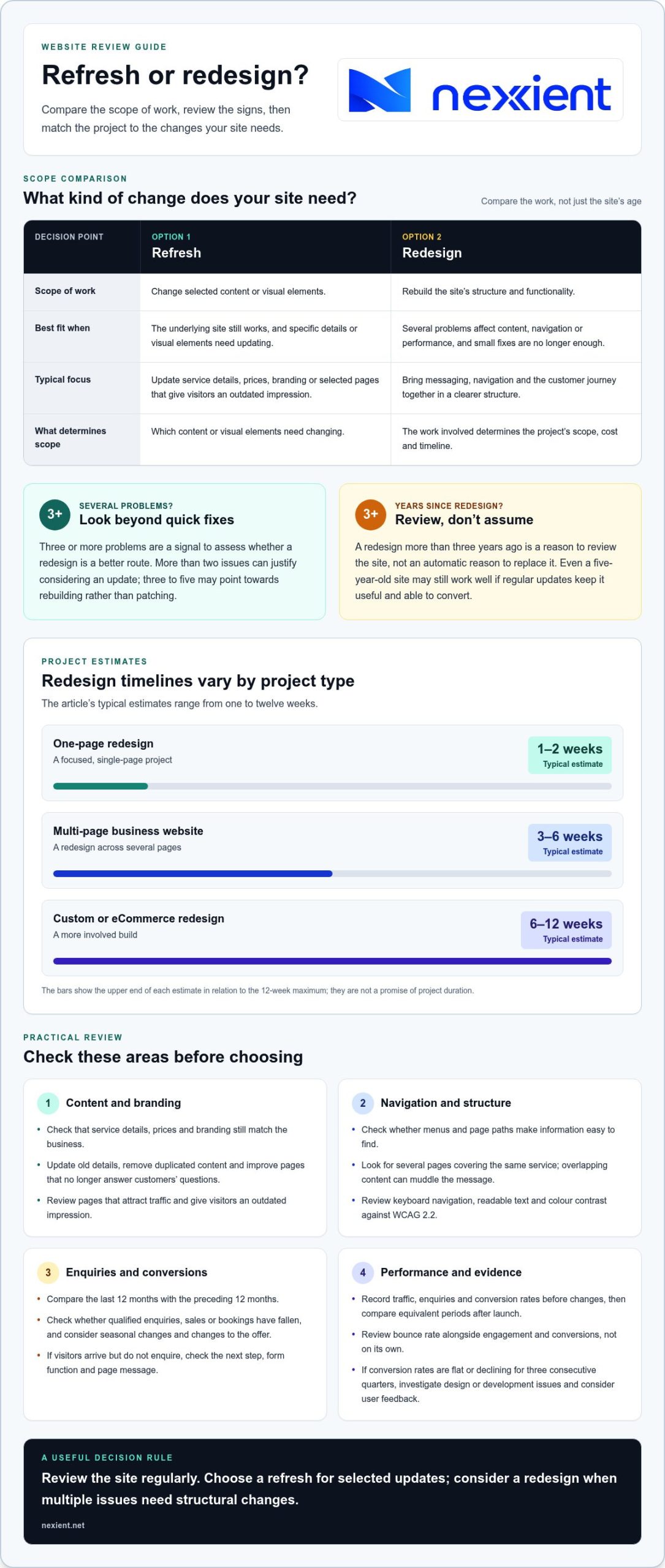
Start with a content audit. Check whether service details, prices and branding still match your business, then update pages that give visitors an outdated impression. A redesign more than three years ago is a reason to review the site, not an automatic reason to replace it. Even a five-year-old website may still be effective if regular updates keep it useful and able to convert.
To compare a refresh with a redesign, consider the scope of work. A refresh changes selected content or visual elements; a redesign can rebuild the structure and functionality, so its scope, cost and timeline depend on the work involved. Typical project estimates range from one to two weeks for a one-page redesign, three to six weeks for a multi-page business website, and six to twelve weeks for a custom or eCommerce redesign.
Fresh, useful content helps visitors find clear answers, while outdated pages can weaken trust and search rankings. Review pages that attract traffic: update old details, remove duplication and improve sections that no longer answer customers’ questions. Then check your menus and page paths. Content creep, such as several pages covering the same service, can muddle your message. Clear navigation and a logical structure make information easier to find.
What accessibility requirements apply to UK businesses in 2026? WCAG 2.2, the Web Content Accessibility Guidelines, is the operating standard for digital accessibility. Use it as a review benchmark, including checks on keyboard navigation, readable text and colour contrast.
There’s no fixed interval for redesigning a business website: review it regularly and consider a redesign when multiple problems affect content, navigation or performance. More than two issues can justify considering an update; three to five may point towards rebuilding rather than patching.
3. Falling enquiries and website conversions
Track website enquiries across matching periods before blaming a redesign or search engines. Compare the last 12 months with the preceding 12 months, and note whether qualified enquiries, sales or bookings have fallen. A seasonal dip may have a different cause from a steady decline, so examine the trend alongside traffic and changes to your offer.
Next, monitor your conversion rate: the share of visitors who complete a valuable action, such as submitting an enquiry form. If visitors arrive but don’t enquire, check whether the next step is clear, forms work and the message matches the page they expect. Compare key pages, such as a service page and contact page, to find where people leave.
To measure whether a website redesign will improve leads and sales, record current traffic, enquiries and conversion rates, then set a clear target for each measure before changing the site. After launch, compare the same measures over equivalent periods to see whether results have shifted.
Look at bounce rate alongside engagement and conversions, not in isolation. A visitor may leave after finding a phone number or opening hours, which can still meet their need. If visitors leave a key service page without taking action, review its content, navigation and enquiry route. Compare how your pages appear in search results with competitors, then check whether the landing page delivers the information promised.
Portent reports that conversion rates drop by an average of 4.4 per cent with each additional second of load time. Use analytics insights to identify slow or underperforming pages, whether your site runs WordPress or another platform. If conversion rates stay flat or decline for three consecutive quarters, investigate whether design or development issues are blocking enquiries. Pair the data with user feedback before deciding which changes matter most.
Nexient: Business Websites
Nexient creates Business Websites for organisations whose current site no longer reflects their services, supports mobile visitors or guides people towards making an enquiry. If the signs point to structural changes rather than isolated content fixes, a new website can bring your messaging, navigation and customer journey together in one clear experience.
Choose a format that fits your goals: an eCommerce Website for online sales, a Landing Page for a focused campaign, or a Charity Website for communicating your organisation’s work. Before planning a project, note the main issues you want to address, the pages visitors rely on and the actions you want them to take. This gives the redesign a practical direction, rather than making changes for appearance alone.
Contact Nexient to discuss a website that supports your next step.
Turn your website into a stronger next step
A website decision is also a chance to clarify what you want visitors to do next. Before making changes, write down the outcome that matters most, such as more relevant enquiries, simpler online purchases or a clearer campaign journey. Use that goal to guide what stays, what changes and how success will be judged.
The signs you need for a new website in 2026 can point towards different solutions, depending on your organisation and priorities. Nexient offers Business Websites, eCommerce Websites and Landing Pages, with each format suited to a different purpose. A focused discussion can help you shape the right direction for your site and its users.
Start a conversation about your website and take the next step with a clear purpose. A considered digital experience can give your business a more confident foundation for growth.
Frequently Asked Questions
How do I know if my website needs a redesign in 2026?
Consider a redesign when customers can’t complete essential tasks, even after straightforward fixes. Test journeys such as finding delivery information, booking an appointment or locating a relevant service page. If broken links, confusing page paths or outdated contact details appear across the site, record them and assess whether they stem from isolated errors or a wider structural problem.
So how much does a redesign actually cost?
The cost depends on the project and is provided after a quote request. Key factors include the number of pages, bespoke functionality, content requirements and integrations. A visual refresh usually involves fewer changes than rebuilding navigation or adding new features. Define what the new site must do, then use that scope to compare options and plan your investment.
What’s the lowest-risk way to find out if my site needs a redesign?
Start with a focused review before committing to a rebuild. Ask a few customers or colleagues to complete a key task, such as finding a product or submitting a booking, and note where they hesitate. Pair their feedback with data about visitor activity and a list of broken journeys. This gives you evidence to prioritise repairs or plan broader changes.
Will a new website improve my Google rankings?
A new website can support better search visibility if it resolves issues affecting access, navigation, content or page speed, but a redesign alone doesn’t guarantee higher rankings. Keep useful pages during a rebuild, and redirect each old page address to its corresponding new page so visitors and search engines can find the right content. Review search performance after launch alongside enquiries and engagement.
What are the main signs a business website needs redesigning in 2026?
Key signs you need a new website in 2026 include site features that no longer support your services, a publishing system that makes routine changes difficult, or important pages that visitors can’t reach. Check whether every form submission reaches the right inbox and whether product or booking information stays accurate. These operational problems can reveal weaknesses beyond appearance.