A full rebuild isn’t the default. Updating an old business website can often start with a focused refresh, and a significant refresh or redesign is typically worth considering every 3–5 years. If the site still supports your business and works well for visitors, it may need better content, clearer navigation or targeted maintenance rather than a new design.
It’s easy to assume an ageing website needs replacing, especially when its appearance no longer reflects your business. But age alone isn’t decisive: performance, usability and how well the site supports your current goals matter more.
This guide explains how to weigh a refresh against a rebuild, how long a business website may last, and which practical updates can improve an existing site without a redesign. You’ll also learn what to review first, so you can focus effort where it will help visitors most.
Key Takeaways
- Choose a refresh when the site’s foundations still support your business; consider a rebuild when its structure or capabilities hold back essential changes.
- Review key pages for outdated details, unclear calls to action and content that no longer matches what customers need.
- Test the site on different devices, checking that text is readable and visitors can find important information easily.
- Make targeted improvements first, such as updating contact details, simplifying navigation and checking forms and links.
1. How outdated website content affects SEO, conversions and customer trust
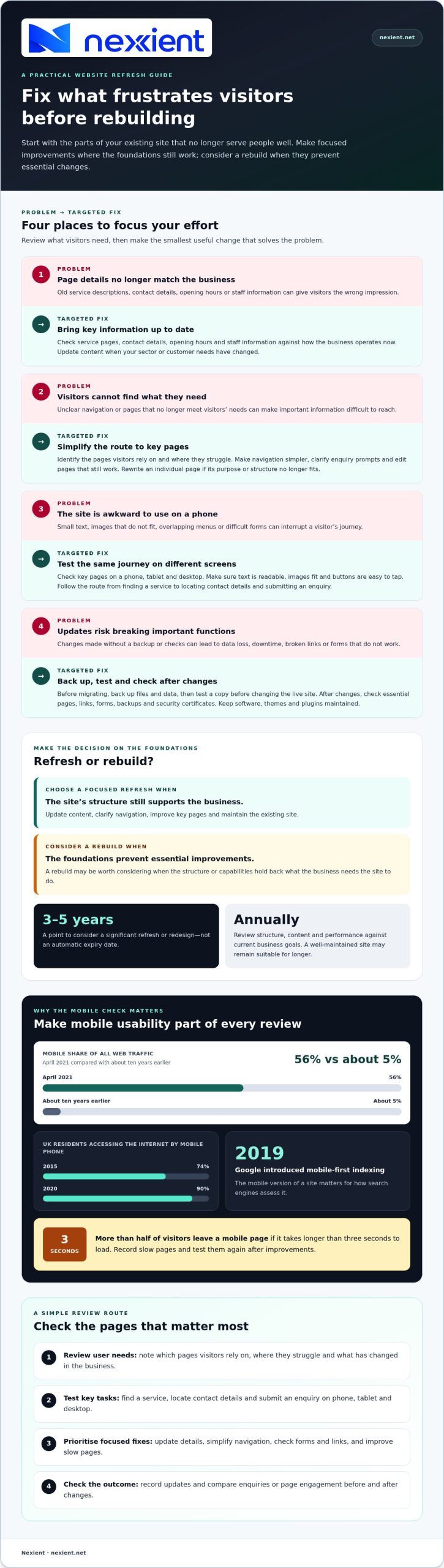
Outdated content can give visitors the wrong impression and make your site harder to navigate. Check service descriptions, contact details, opening hours and staff information against how the business operates today. If you now serve a different sector, for example, update the relevant pages so prospective customers see that change.
For SEO, align each page with what visitors want to find. Refresh marketing content when it no longer meets that need, and review older blog posts for outdated details, useful links and current search intent. An eCommerce site should also keep product information accurate and category pages useful, helping shoppers compare options and find the right products. A content refresh may be enough if the page structure still works. Rewrite the page if its message, structure or purpose no longer fits.
A website builder can work well for straightforward edits you can manage within its tools. WordPress may suit a site that needs a content management system, software for creating and managing pages and posts, but it requires ongoing maintenance. Consider agency support when updates involve a wider redesign, custom functionality or a coordinated content and SEO plan.
For UK websites, include privacy information, cookie use and accessibility in your compliance checks. The Information Commissioner’s Office says personal data must be deleted when the right to erasure applies, unless a data protection exemption applies.
Before migrating a site, back up its files and data, then test the copy before changing the live version. After launch, check forms, links and essential pages. A missed backup or rushed change can lead to data loss or downtime.
To improve speed, security and SEO, review images, software updates, broken links and page content. Test key pages on mobile and desktop, and make sure visitors can complete important actions, such as submitting an enquiry.
2. How Long Should a Business Website Last Before It Needs Updating?
A business website may merit a significant refresh or redesign every three to five years. Treat this as a review point, not an automatic expiry date. A well-built site can last longer than five years if it is maintained and still meets business needs. Review it annually, comparing its structure, content and performance with current goals. Consider a rebuild if the foundations prevent essential improvements or no longer reflect your business.
Mobile responsiveness is central to that review. In April 2021, mobile phones accounted for 56% of all web traffic, compared with about 5% ten years earlier. In the UK, 74% of residents used mobile phones to access the internet in 2015, rising to 90% in 2020. Google introduced mobile-first indexing in 2019, making the mobile version important for how search engines assess a site.
Test the same key pages on a phone, tablet and desktop. Check that headings and text are readable, images fit the screen and buttons are easy to tap. Then follow the main customer journey: find a service, locate the contact details and submit an enquiry. If menus overlap or forms are difficult to complete, prioritise those fixes. Check that branding remains clear at each screen size, rather than simply shrinking the desktop layout.
Also assess loading speed: more than half of visitors leave a mobile page if it takes longer than three seconds to load. Record slow pages and test them again after improvements. If your mobile layout needs broader structural work, discuss your website’s needs with the team.
3. Updating an existing website without a redesign
Start with a focused review, not a new visual concept. UK Government guidance recommends identifying users’ needs before changing content. Note which pages visitors rely on, where they struggle and what business changes the site must reflect. This gives each update a clear purpose and helps you avoid editing pages that already serve their audience.
Next, prioritise changes that strengthen the existing site. Update service details and calls to action, then simplify navigation if visitors need too many steps to reach key pages. Replace outdated images or copy that no longer represent the business. If a page still meets its purpose, edit it. If its purpose or structure no longer works, rewrite that page rather than the entire site.
Check the user experience and the route to an enquiry. Test forms, links and buttons, then submit a test enquiry to confirm it reaches the right place. Review loading on key pages and reduce oversized images where appropriate. For an online shop, improve a product description or category page, then check that customers can find and understand the information they need.
If your site uses a content management system, software for creating and managing website content, include routine software upkeep. Update the theme, which controls the site’s appearance and layout, and plugins, which add features such as forms. After changes, check backups, security certificates, broken links and forms. Record each update and compare enquiries or page engagement before and after, so future improvements build on evidence.
If your website’s structure is holding back focused improvements, discuss a practical website update.
Nexient: Business Websites
Nexient can help when targeted edits are no longer enough or your current site cannot support how your business works. Its Business Websites offer a considered online presence, while eCommerce Websites help businesses present and sell products online. Landing Pages focus attention on a particular offer or campaign, and Charity Websites serve the needs of charitable organisations.
Before choosing a refresh or rebuild, note what is working, what visitors find difficult and what the next version needs to achieve. Share those priorities with Nexient to shape a practical direction, whether that means a new site or a more focused solution. To discuss the right approach for your business, contact Nexient.
Give your next website update a clear direction
Choose changes that support your business, rather than redesigning for appearance alone. Updating an old business website starts with understanding what visitors need from it now. Write down the tasks the site should help them complete and what currently gets in their way. Let those priorities guide whether you improve the existing site or plan a rebuild.
Next, set a clear brief for the work. Note the experience you want visitors to have and the actions you want them to take. A well-planned approach to updating an old business website can align the site with your next stage of growth. Nexient can help turn those priorities into a considered website solution for your business.
Contact Nexient to discuss your website and take the next step with a clear direction. A focused decision today can give your online presence room to grow.
Frequently Asked Questions
Do I need a full website rebuild, or just a refresh?
Choose a refresh if the site can still support your goals and visitors can complete key tasks. If an enquiry form works but your services have changed, for example, update the content and calls to action. A rebuild makes more sense when the site’s structure prevents essential changes or cannot deliver the experience your business now needs.
Does an old website always need replacing?
No. Age alone doesn’t mean a website needs replacing. A site may still serve your business if it remains usable, secure and easy to maintain. Consider its results and limitations: if customers can find accurate information and complete important tasks, targeted improvements may be more appropriate than starting again.
How Long Should a Business Website Last Before It Needs Updating?
Use three to five years as a prompt for a significant review, not a fixed replacement deadline. A well-built website can last longer than five years if it is maintained and still suits the business. Consider whether its design, content and capabilities reflect your current priorities, then decide what level of change will address any gaps.
Why do websites become outdated?
Websites become outdated as a business, its customers and digital expectations change. A Worcestershire firm may add services, change opening hours or serve different customer groups while its website still describes the old setup. Software and design patterns also evolve, so regular maintenance and content reviews help prevent small mismatches from adding up.
What is the difference between refreshing a website and rebuilding it?
A refresh improves parts of the existing site, such as wording, images, page layout or navigation, while keeping its main structure. A rebuild replaces that underlying structure and may change how pages and features work. Updating service pages is usually a refresh; reorganising the whole site around new customer journeys points towards a rebuild.