
The most important part of a website project can happen before anyone opens a design tool. If goals are unclear, content is missing or decisions are left until the last minute, even a capable team can lose momentum. Learning how to plan a website project gives everyone a shared view of what the site needs to achieve, who needs to contribute and what’s in scope. Your plan doesn’t need to be technical; it needs to make the important decisions clear.
This guide will help you define a purpose, set priorities and organise the people, information and approvals needed before design and development begin. You’ll also see how planning differs for a brochure website, an online shop or a data-driven application. Work through the steps to set shared expectations, reduce avoidable delays and give your project a clear direction from day one. For businesses in Worcestershire, a practical plan can also help make the most of conversations with a local web design and development team.
Key Takeaways
- Start with a clear purpose and a small set of measurable objectives so everyone knows what success means.
- Learn how to plan a website project by gathering the right inputs, mapping pages and assigning content responsibilities.
- Bring decisions, page plans and approval roles together in one working brief to keep the project aligned.
- Set plain-English acceptance criteria so stakeholders can agree when each stage is ready to move forward.
How to plan a website project by defining its purpose and scope
A useful website plan starts with shared decisions, not a list of design ideas. Agree what the site needs to achieve, who it needs to serve, what’s included at launch and which decisions must be made before design and development begin. These agreements give your team and design and development partner a clear basis for prioritising the work.
A website goal describes the result you need; a website feature describes one possible way to achieve it. For example, “help more prospective clients enquire” is a goal. An enquiry form is one feature that may support it. Make the goal measurable by choosing an indicator and timeframe, such as tracking completed enquiries during the first few months after launch. Keep each objective specific and in plain English.
What should a website project plan clarify first?
Start with your audiences. For each one, note what they need to do on the site and why that action matters to the business. A prospective client might need to understand your services and send an enquiry; an online shopper might need to find a product and complete a purchase. These needs help you decide which pages and content matter most.
Next, separate launch essentials from later improvements. Mark each proposed item as “needed for launch” or “consider later”. If people disagree, ask whether the item is necessary to meet an agreed project objective. This keeps the scope manageable while leaving room for future improvements.
Priorities depend on the type of project. A brochure website may need clear service information and easy-to-find enquiry routes, while an online shop needs a straightforward path from product discovery to purchase. A data-driven application may instead centre on the tasks users need to complete and the information they need to work with. Understanding the broad stages and disciplines of web development can help explain why these decisions belong in the plan. To learn how to plan a website project, connect each proposed feature to an audience need and a business objective before including it in the launch scope.
How to organise a website project plan without slowing progress
Planning doesn’t mean settling every detail before work can begin. It means making the decisions that shape the work visible, so design can start with fewer unanswered questions. Early choices can help prevent avoidable changes later, though they can’t guarantee a faster project. Keep the plan practical by recording what’s known, what’s missing and who will decide.
Which planning tasks should happen before website design starts?
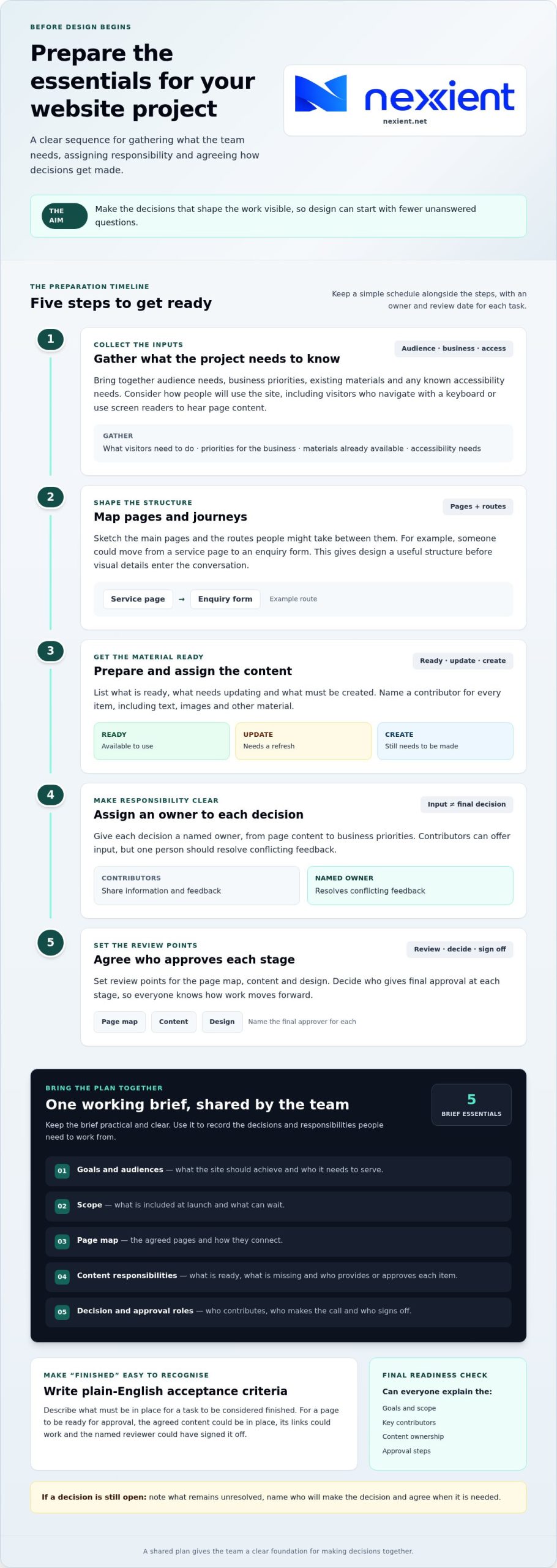
Use this sequence to prepare the essentials:
- Gather inputs. Bring together audience needs, business priorities, existing materials and any known accessibility needs. Consider how people will use the site, including visitors who navigate with a keyboard or use tools such as screen readers to hear page content.
- Map pages and journeys. Sketch the main pages and the routes people might take between them, such as moving from a service page to an enquiry form. This gives design a useful structure before visual details enter the conversation.
- Prepare content. List what’s ready, what needs updating and what must be created. Name a contributor for each item, including text, images and other material.
- Assign owners. Give each decision a named owner, from page content to business priorities. Contributors can offer input, but one person should resolve conflicting feedback.
- Agree approvals. Set review points for the page map, content and design, and decide who gives final approval at each stage.
Put these tasks on a simple schedule, with an owner and review date beside each one. Everyone can then see what’s needed next and where a decision is holding things up. A practical how to plan a website project approach keeps the plan short enough to use and clear enough to guide collaboration. If you’re shaping a project with a design and development partner, talk with Nexient about your website plans.
How to prepare a website project brief and move into delivery
Bring your decisions together in one working brief. It doesn’t need to be long or formal; it needs to help your team and design and development partner understand the same priorities. Include:
- Goals and audiences: what the site should achieve and who it needs to serve.
- Scope: what’s included at launch and what can wait.
- Page map: the agreed pages and how they connect.
- Content responsibilities: what’s ready, what’s missing and who will provide or approve each item.
- Decision and approval roles: who contributes, who makes the call and who signs off.
Make completion clear with acceptance criteria: plain-language statements describing what must be in place for a task to be considered finished. For example, a page might be ready for approval when it contains the agreed content, its links work and the named reviewer has signed it off. For a brochure site, brochure website planning can focus on the agreed pages, content and enquiries the site needs to support.
How can you tell when a website project is ready to begin?
Check that everyone can explain the goals, scope, key contributors, content ownership and approval steps. Note unresolved decisions, name who will make them and agree when they’re needed. This final check turns the brief into a practical reference rather than a document that gets filed away. As you learn how to plan a website project, remember that a shared brief gives your design and development team a clear foundation for making decisions with you.
When you’re ready to discuss how your plan can move into delivery, discuss your website project with Nexient.
Turn your plan into your next step
A website plan can keep guiding decisions as the project takes shape. Treat it as a working reference: update it when priorities change, record agreed decisions and check that new ideas still support the outcome you set. This gives your team a steady point of reference without ruling out useful improvements.
If you’re balancing how to plan a website project with day-to-day business priorities, a collaborative perspective can help turn your thinking into a practical way forward. Nexient brings website design, development and practical strategy together across brochure websites, eCommerce sites and custom digital solutions, supporting businesses in Worcestershire and beyond.
Explore your project’s next steps with Nexient and move from a clear plan towards a website built around your goals.
Frequently Asked Questions
How long does it take to plan a website project?
There’s no fixed planning period. It depends on the site’s complexity and how quickly people can provide information and make decisions. A focused brochure site may need fewer discussions than an online shop with product details or a web application with several user needs. Set a target date, then track progress against the decisions made and content gathered rather than rushing to meet a deadline.
What should I include in a website project brief?
Include the business context the team needs to make informed choices: what prompted the project, what the current site doesn’t support and any important constraints. Note existing systems the new site may need to work alongside, such as a booking or customer database. Also record what’s outside the project, so useful ideas don’t quietly become assumed requirements.
Can I plan a website project without technical knowledge?
Yes. You can explain the problem, the people affected and what a better outcome would look like without choosing technical tools. For example, describe what staff need to do with customer information rather than prescribing how a system should store it. A clear account of your needs gives the design and development team the context to shape suitable options and explain the trade-offs in everyday language.
When should I involve a web design and development agency?
Involve an agency once you can describe the business need, ideally before committing to a platform, detailed features or a fixed page list. Early discussion can help test your assumptions and highlight decisions that need more thought. For a Worcestershire organisation, bring a rough outline rather than waiting for a polished brief; open questions are a useful starting point.