A security plugin can’t make your website secure on its own. If you’re wondering how to make my website secure, start with the basics that reduce avoidable risks: protect accounts, update software and keep reliable backups. It’s understandable to feel unsure where to begin when customer information, site access and your reputation are at stake.
You don’t need to become a security specialist to build a stronger routine. This guide gives you a practical order of actions, from securing access and using HTTPS to reviewing site components and preparing for recovery. You’ll also learn how regular maintenance helps keep those actions on track. Security is a process, not a one-off fix, so start with the steps you can take now and review them as your website changes.
Key Takeaways
- Identify risks across your website, its data, accounts and visitors instead of relying on one security feature.
- Follow a clear sequence, from strengthening access to preparing to restore your site.
- Understand what HTTPS protects and why an encrypted connection alone doesn’t secure every part of your website.
- Schedule regular reviews of access, updates, backups and security alerts, with development or maintenance support where useful.
How to make my website secure starts with understanding its weak points
Website security means reducing risks to your site, its data, its accounts and the people who visit it. To work out how to make my website secure, look beyond the padlock in the browser. HTTPS encrypts information as it travels between a visitor’s browser and your site, but it doesn’t automatically protect your website platform, hosting environment or administrator accounts.
Each security measure addresses particular risks. A security strategy brings several measures together and keeps them working over time. HTTPS is valuable, but it won’t update an outdated plugin or prevent someone from using a compromised administrator password. For a wider introduction to the threats and safeguards involved, explore understanding web security.
Which parts of a business website need protection?
Make a quick inventory of your website setup. Note what you use, who manages it and what needs attention. A weakness in one area can create a different problem from a weakness elsewhere.
- Website platform: Check which version you’re using and whether an update is available. Updates can address known weaknesses, so plan to apply them rather than leaving them indefinitely.
- Plugins or extensions: List what’s installed, who uses it and whether it’s still needed. Remove unused components, since they can still require maintenance.
- Hosting environment: Note where your site runs and which hosting settings or responsibilities affect its security. Keep the relevant account details accessible to the person responsible for the site.
- Administrator accounts: Review who has access and remove accounts that are no longer needed. Give each person their own login so you can see who can change the site and update access when responsibilities change.
- Recovery plans: Find out how backups are created and where they’re kept. Make sure you know the steps for restoring your site if something goes wrong.
Use this inventory to choose your next actions. Priorities depend on your website’s setup, the information it handles and how your team uses it. For example, a site with customer accounts needs a different access review from a basic brochure website.
How to make my website secure with a practical action plan
A practical answer to how to make my website secure is to tackle the basics in a clear order. Work through these steps, record what you’ve done and revisit them when your site changes.
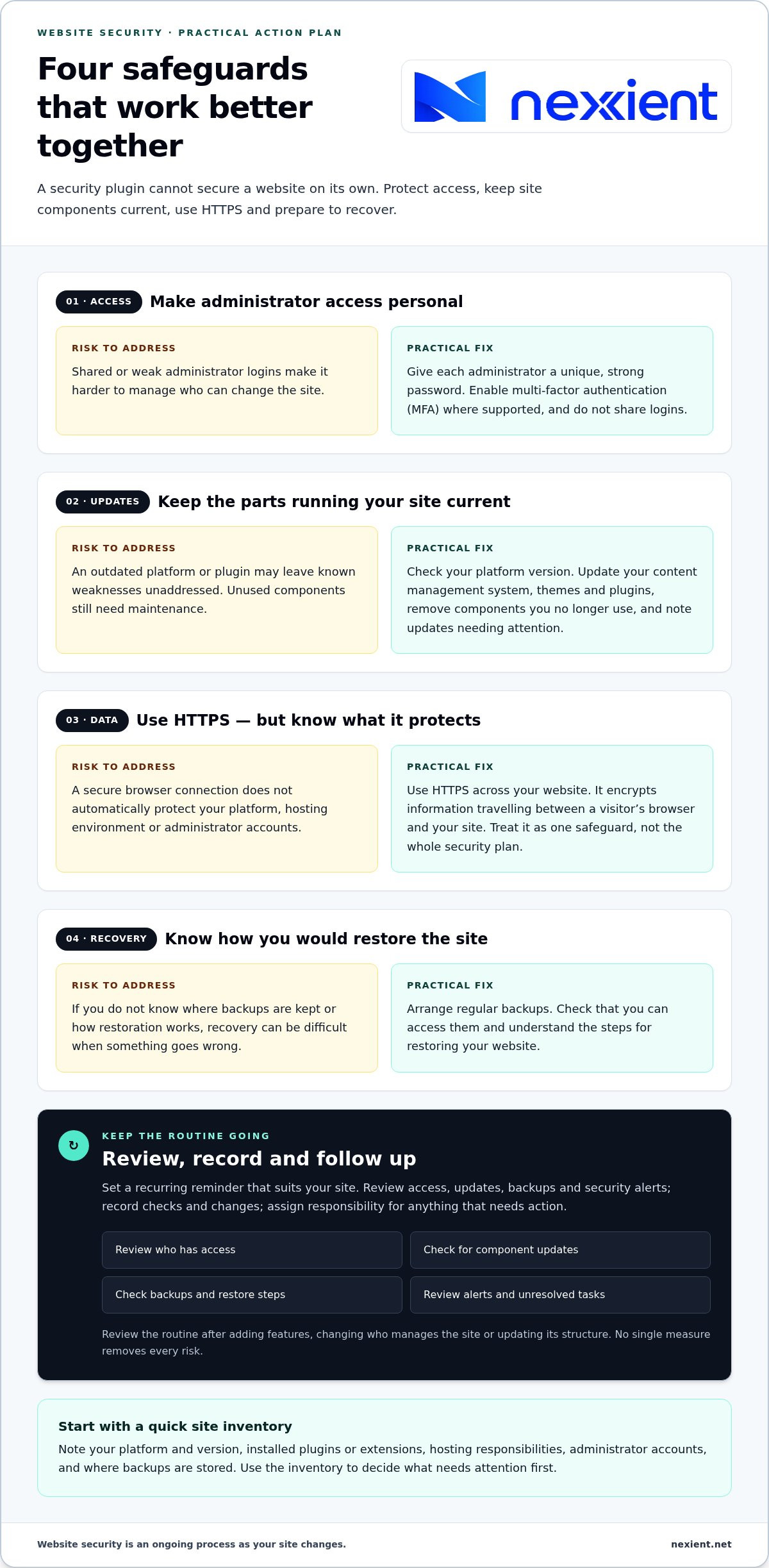
- Secure access. Give each administrator a unique, strong password and enable multi-factor authentication (MFA) where your platform supports it. MFA asks for a second proof of identity, such as a code, as well as the password. Don’t share administrator logins between team members.
- Update components. Keep your content management system, themes and plugins current. Remove anything you no longer use, and make a note of any updates that need further attention.
- Protect data. Use HTTPS across your website. It encrypts information as it travels between a visitor’s browser and your site, helping keep that connection private. HTTPS is one safeguard, not a substitute for the other steps.
- Prepare recovery. Arrange regular backups and learn how to use them to restore your site. A backup is a separate copy of your website’s data and files that can help you recover after a problem. Check that you can access the backup and understand the restore process.
What should I prioritise first on my website?
Start by reviewing administrator access, then update your platform and remove unused components. These are practical areas to address without trying to solve every possible risk at once. Strengthen access, update what runs your site and clear out unused components to create a stronger starting point, while remembering that no single step removes all risk.
Security also belongs in the planning stage. Decisions about the platform, features and access can affect how straightforward a site is to maintain. Nexient considers these practical needs when creating business websites. If you’re planning a new site or improvements to an existing one, discuss your website needs with Nexient.
Keep website security effective with regular maintenance and the right support
Make your security routine fit the way your site is built and managed. Set a recurring reminder to review who has access, whether site components need updates, whether backups are working and whether any security alerts need attention. Choose a schedule that suits your setup and how often it changes. Review the routine after adding features, changing who manages the site or updating its structure.
Keep a simple record of checks, changes and issues. This helps you spot overlooked tasks and understand what changed if something unexpected happens. If alerts are difficult to interpret, updates disrupt your site or no one has time for routine checks, development or maintenance support can help organise the work. Ongoing attention is part of how to make my website secure, but it can’t remove every risk.
How can website maintenance support a security routine?
Regular maintenance helps prevent site updates and routine checks from being overlooked. It can bring updates, access reviews, backup checks and alert follow-up into a consistent process that suits your website. If upkeep is taking attention away from your business, website maintenance support can help keep those tasks in view as your site develops.
After each review, note what needs action, assign responsibility and follow up on anything unresolved. If you’re planning changes or want to discuss a workable maintenance approach, discuss your website needs with Nexient.
Website security needs continued attention as your site changes.
Build security into your website’s next step
Your next website change is an opportunity to include security in the plan rather than treat it as an afterthought. When you add a feature, bring in a team member or change how the site works, review whether your existing approach still fits. This makes how to make my website secure an ongoing business decision, not just a technical task.
For businesses in Worcestershire, Nexient designs and develops professional websites and provides website maintenance. These services can help bring practical considerations into building and caring for a site. No single setup removes every risk, but a considered plan can help you make informed choices and keep security in view as your needs evolve. To plan your next website step, talk through your project with Nexient.
Frequently Asked Questions
Is HTTPS enough to make my website secure?
No. HTTPS protects the connection, but it won’t tell you whether an administrator account has been compromised or an add-on is no longer supported. Treat it as one part of your safeguards. For example, an online shop should also review who can access orders and customer information and make sure its site components are maintained.
Can a small business website be completely secure?
No setup can promise complete security, but you can reduce avoidable weaknesses. A practical answer to how to make my website secure is to consider what your site does and protect it accordingly. A simple brochure site may have different priorities from an online shop or a web application with customer accounts. Reassess those priorities when your site or team changes.
What should I do if I think my website has been hacked?
Act promptly, but avoid deleting files or making rushed changes that could remove useful information. Record what you’ve noticed and when, then contact the person responsible for your website or hosting so they can investigate. From a trusted device, secure the email account used for site administration and follow the recovery advice for your specific setup.
How often should I review my website security?
Choose a recurring review schedule that fits your website’s update cycle, and check sooner after a major change. For example, a Worcestershire business that adds a booking form or new staff accounts should review access and site settings as part of that change. Keep a brief record of checks and outstanding tasks so the next review has a clear starting point.