
A confusing website can undermine a strong offer before visitors discover its value. To learn how to improve website user experience, make it easier for people to find information, understand what to do next and complete tasks on any device. Clear guidance, consistent calls to action and mobile-first design all help reduce friction. That matters because a smooth visit supports both customer confidence and business goals.
A polished website also needs to feel intuitive to use. This guide explains why user experience matters and shares practical ways to improve navigation, page guidance and mobile usability. Small, purposeful changes can help visitors move from their first impression to the next step with less friction.
Key Takeaways
- Make the next step obvious with consistent calls to action and brief, relevant guidance.
- Design for smaller screens first, then check that content and navigation work smoothly across devices.
- Use visitor feedback and behaviour to spot friction, prioritise improvements and assess their effect on business goals.
- When your website needs a more considered redesign, Nexient’s business, eCommerce, landing page and charity websites can provide a practical next step.
1. Providing clear calls to action and contextual guidance
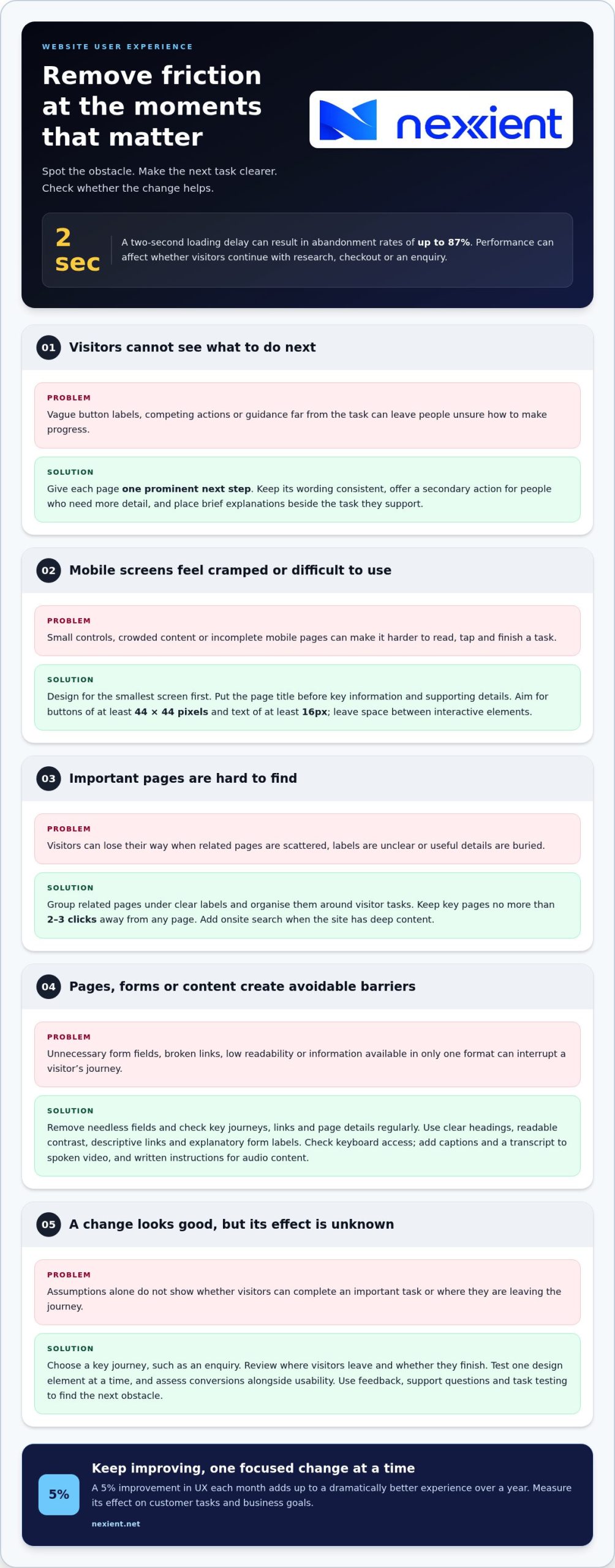
Give each page one prominent next step, such as “Book a consultation” or “View delivery options”. Keep button wording consistent, then offer a secondary action, such as “Learn how it works”, for visitors who need more detail. Use visual hierarchy to make the main action easy to spot, and place guidance beside the task it explains. For example, add a brief explanation next to a complex form field. This helps visitors make progress without confusion.
To make a UK website more accessible, use clear headings, readable contrast, descriptive links and labels that explain each form field. Check that visitors can navigate every function by keyboard; the World Wide Web Consortium (W3C) says website functionality should work through a keyboard without requiring specific keystroke timing.
Common UX mistakes include vague button labels, broken links, outdated information and forms that ask for unnecessary details. Test key user journeys, remove needless fields, and regularly check links and page content as part of website maintenance.
Improve page speed by resizing images and using a content delivery network, which serves cached content from servers closer to visitors. Review each page for accuracy, too: update outdated details, fix broken links and replace vague copy with a specific headline, such as “Choose a delivery option” instead of “More information”.
Present important information in formats that suit different situations. Add captions and a transcript to spoken video, and provide written instructions for visitors who cannot play audio. Consider where people use your site: someone browsing on a phone in a noisy setting may need concise text, clear controls and guidance beside the relevant action. Keep navigation and page structure consistent across devices.
2. Mobile-first design
Design for the smallest screen first, then adapt the layout for larger devices. Google uses mobile pages for indexing, so make sure mobile content and navigation are complete. Establish a clear visual hierarchy: put the page title first, followed by key information and then supporting details. This helps visitors scan the interface while keeping the main task in view.
Design controls for touch, not just a mouse. Aim for mobile buttons of at least 44×44 pixels and text at a minimum of 16px, so taps and reading feel comfortable. Keep space between interactive elements to reduce accidental selections. Optimise images for their display size, and use whitespace to separate content. These steps make the screen easier to scan and help important actions stand out.
To improve website navigation and information architecture, group related pages under clear labels, then order them around visitors’ tasks. Keep key pages no more than 2-3 clicks away from any page, and add onsite search when the site has deep content. For example, place delivery details within a clearly named help area rather than burying them under general information.
Responsive design adapts layouts, content and functionality to different screen sizes. Test a real task, such as finding a product and completing checkout, on a phone, tablet and desktop. Check that images resize without obscuring details, navigation remains usable and forms fit the screen. These user-focused checks help identify friction and improve the experience across devices.
3. Business impact of website user experience
Good user experience (UX) design connects usability with commercial performance. When visitors can find information, understand an offer and complete a task, they face fewer barriers to taking action. A two-second delay in loading can result in abandonment rates of up to 87%, making performance a business concern, not merely a technical detail. Slow pages can interrupt product research, checkout and enquiries, especially on mobile devices.
Which changes can have the biggest impact on conversions? Prioritise obstacles between visitors and their goals: slow pages, confusing checkout steps, unclear costs or forms that ask for unnecessary details. If you’re deciding how to improve website user experience, start with the friction closest to an important action. For example, simplify a purchase journey by removing redundant fields and making the next step easy to identify.
Measure the effect rather than relying on assumptions. Choose a key journey, such as completing an enquiry, then review where visitors leave and whether they finish the task. A/B testing compares two versions of a design element, such as a button label, to see which performs better. Change one element at a time and assess conversions alongside usability, so more clicks don’t mask a harder-to-complete journey.
Keep improving. A 5% improvement in UX each month adds up to a dramatically better experience over a year. Use visitor feedback, support questions and task testing to identify the next obstacle. For a practical approach to how to improve website user experience, make one focused change, then measure its effect on customer tasks and business goals.
Discuss a UX-focused website improvement if you’re ready to turn customer friction into a clearer digital journey.
Nexient: Business Websites
Nexient designs business websites for organisations that want a clearer, more useful online experience. If your current site makes key information hard to find or leaves visitors unsure what to do next, a considered redesign can align its structure, content and calls to action with your goals.
Choose a format that suits your audience and purpose: business websites to present your organisation, eCommerce websites for online sales, landing pages for focused campaigns, or charity websites to communicate your work and invite support. Each project can be shaped around how visitors use the site, from finding essential information to completing a task.
Bring your priorities, audience needs and areas of friction to the conversation. Nexient can use them to shape a website that makes information easier to navigate across screen sizes. To discuss your website needs, contact Nexient or visit nexient.net.
Make your next improvement count
A better digital experience comes from deliberate choices, not just a one-off redesign. Identify the visitor journey that matters most to your organisation, then set a clear goal for improving it. That focus helps you choose changes that support your audience and wider plans.
If your website no longer reflects how people need to interact with your organisation, Nexient offers Business Websites, eCommerce Websites and Landing Pages. These formats address different needs, from presenting your organisation to guiding visitors towards a campaign or online purchase.
To explore how to improve website user experience in a way that fits your goals, bring the journey you want to strengthen and the outcome you want visitors to reach. Contact Nexient to discuss your UX and take the next step with clarity and confidence.
Frequently Asked Questions
Why is user experience crucial?
User experience affects whether people can complete important tasks and feel confident doing so. A confusing booking journey, for example, may lead a potential customer to abandon an enquiry before submitting it. Clear, usable pages also help people find information independently. UX is part of service delivery: it shapes how customers experience your organisation before they speak with your team.
What is a heatmap, and how does it help improve UX?
A heatmap visually summarises how visitors interact with a page, such as where they click, move a pointer or scroll. It can reveal patterns, such as visitors overlooking an important link or repeatedly clicking a non-interactive image. Use these insights to investigate a specific page, then compare them with the intended journey before changing the layout.
How can I improve my forms and checkout UX specifically?
Make every form field necessary. For an enquiry form, request only the details needed to respond, label fields clearly and show errors beside the relevant entries. For checkout, present delivery, payment and order review as distinct stages, and keep entered information visible as customers proceed. Test the journey on a phone as well as a desktop.
How can I see where users struggle without relying on opinions?
Track task outcomes and behaviour on the relevant pages. For example, use analytics to compare visits to a booking page with completed bookings, and review form errors or exits at each step. Combine those signals with session recordings or heatmaps to see where interaction breaks down. Remove personal information from recordings and handle visitor data responsibly.
How can I validate UX changes and A/B tests beyond conversion rates?
Assess whether a change makes the task easier, not just whether more people click. Track completion, time to finish, error rates and customer support queries alongside conversions. Compare results for relevant visitor groups, such as mobile and desktop users, and check that improvements in one journey haven’t caused problems elsewhere. Keep the original version available until the evidence supports a decision.