
A CRM project can add admin if it is built around a feature list rather than the way your team works. The real challenge in crm software development is deciding what to solve first, before customer data, integrations and user adoption become difficult to coordinate. For businesses in Worcestershire, a clear plan helps make sure the system supports the work your team actually does.
It’s understandable to want customer information in one place while worrying that a new platform could complicate everyday tasks. Start by mapping your team’s processes, the information people need and the points where work gets stuck. That gives development a practical direction and helps keep the scope focused.
This guide covers the main stages of planning, developing and launching a CRM system, including what to prepare and how to assess whether a tailored approach fits your business. You’ll learn how to turn requirements into a system shaped around real work, then test it in stages so your team can use it with confidence.
Key Takeaways
- Review repeated tasks, scattered customer records and unclear handovers to identify where your current systems are letting the team down.
- Plan crm software development in manageable stages, from prioritising requirements to testing before launch.
- Prepare process notes, user roles, data sources and project goals to give development a clear starting point.
- Consider how a tailored CRM or data-driven web application could support the way your business works in Worcestershire.
CRM software development starts with the work your business needs to improve
A customer relationship management (CRM) system organises customer information and related interactions, helping your team manage relationships and keep work moving. For a foundational overview, see What is CRM?
Look for friction in your current processes. Do staff enter the same details more than once, search across separate spreadsheets and inboxes, or lose track of who should follow up after a conversation? These are useful signs that your systems may need a review. A CRM should address the underlying task, not simply reproduce every existing step in a new place.
CRM development is the process of shaping and building a system around the customer information and workflows a business needs to manage. Separate project goals from feature requests. “Make follow-ups easier to track” describes a goal; “add a dashboard” is one possible feature. Agree on the problem first, then decide which functions will help solve it.
Turn day-to-day challenges into clear CRM goals
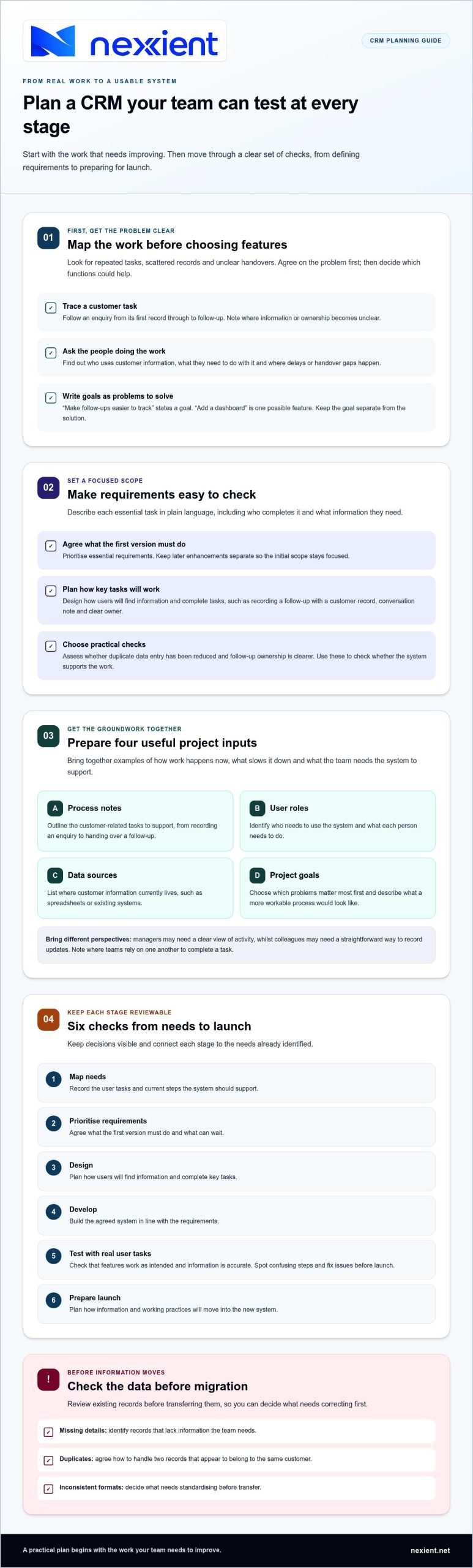
Map who uses customer information, what they need to do with it and where delays or handover gaps occur. Talk to the people doing the work, not only managers. For example, trace how an enquiry moves from its first record to a follow-up, noting where ownership or information becomes unclear. If you’re considering broader process automation, the business process automation guide can help you identify tasks that might benefit from a more deliberate workflow.
Next, agree practical ways to assess the system with your team, such as whether duplicate data entry has been reduced or follow-up ownership is clearer. Use these as checks on whether the system supports the work, not as promises of sales or productivity gains. With those priorities established, Nexient can shape custom CRM systems around your processes.
Plan CRM software development in clear, testable stages
A clear sequence turns CRM software development from a broad idea into a project your team can review as it takes shape. Keep each stage connected to the needs you identified, and make decisions visible before work moves forward.
- Map needs: Record the user tasks and current steps the system should support.
- Prioritise requirements: Agree what the first version must do and what can wait.
- Design: Plan how users will find information and complete key tasks.
- Develop: Build the agreed system in line with the requirements.
- Test: Check that features work as intended and information is accurate.
- Prepare launch: Plan how information and working practices will move into the new system.
Write requirements your team can validate
Describe each essential task in plain language, then note who completes it and what information they need. For example, recording a follow-up may require a customer record, a note about the conversation and a clear owner. Separate must-haves from later enhancements to keep the initial scope focused. If you’re weighing tailored development against existing software, explore this custom CRM versus off-the-shelf guide.
Plan data migration, the process of moving existing information into the new system, before launch. Review records for missing details, duplicates and inconsistent formats, then decide what needs correcting before transfer. For instance, agree how your team will handle two records that appear to belong to the same customer. Preparing data first helps avoid carrying preventable problems into the new CRM.
Test the CRM with real user tasks before launch, so your team can spot confusing steps and fix issues while there’s still time to act. For a broader technical perspective, Scalable CRM platform development explores CRM platform development and enterprise transformation. Nexient develops custom CRM systems around project requirements. You can discuss your CRM requirements with Nexient.
Move from a CRM development plan to a system your team can use
Good preparation turns your priorities into a focused project brief. Gather practical examples of how work happens now, including where information is recorded, who updates it and what slows a task down. This gives development a clearer foundation than a feature wish list alone.
Before you begin, pull together:
- Process notes: Outline the customer-related tasks you want the CRM to support, from recording an enquiry to handing over a follow-up.
- User roles: Identify who needs to use the system and what each person needs to do.
- Data sources: List where customer information currently lives, such as spreadsheets or existing systems.
- Project goals: Choose the most important problems to address first and describe what a more workable process would look like.
Prepare for a focused CRM project conversation
Bring together the people who make project decisions and the colleagues who handle customer information day to day. Their perspectives can reveal different needs. For example, managers may need a clear view of activity, while colleagues need a straightforward way to record updates. Agree which processes need attention first and note where teams depend on one another to complete a task.
Nexient develops custom CRM systems and data-driven web applications, shaping the work around your project’s requirements. A tailored approach connects the system’s design to the processes and priorities you have identified. You can explore custom systems development to understand this related work.
With your notes gathered, you’ll be better placed to define the scope and priorities for crm software development. The Nexient contact page is available for discussing your project.
Give your next CRM step a clear direction
The strongest starting point isn’t a long list of features. It’s a shared view of what your team needs to do more clearly and what information will help them do it. Use that view to decide whether a tailored system is a good fit and which problems deserve attention first.
Nexient develops custom CRM systems and data-driven web applications for businesses in Worcestershire and across its England-based local market. The work can turn your priorities into a considered crm software development project shaped around your organisation’s needs.
Bring your goals and process notes into the conversation to start defining a system your team can use. Discuss your CRM development project with Nexient.
Frequently Asked Questions
What is CRM software development?
CRM software development is the work of creating or tailoring a digital system to support how staff manage customer-facing tasks. For example, a business might need enquiry records connected to follow-up ownership and service history, rather than scattered notes. Development translates that need into agreed functions, then checks whether they support the intended work.
How long does it take to develop CRM software?
The timeframe depends on the project’s scope. A focused system with a small set of requirements differs from one involving complex connections to other software, extensive data preparation or several rounds of testing. For a useful project plan, set out the requirements, identify tasks or systems the work depends on, and agree review points so you can see how decisions affect the schedule.
Should a small business build a custom CRM?
A custom CRM may suit a small business if essential customer workflows don’t fit the way existing software is organised, or if workarounds create recurring problems. Compare the value of a closer fit with the effort involved in developing and maintaining a tailored system. For a Worcestershire business, start by documenting where standard processes fall short and which gaps matter most.
What should I prepare before starting a CRM development project?
Choose a project decision-maker and someone responsible for the accuracy of customer information. Gather a few representative scenarios, such as how an enquiry is handled or a service issue is passed on. These examples help define what the system should do and how you’ll judge whether it works, beyond simply confirming that it opens and saves records.