
The most popular membership platform may still be the wrong starting point. First decide what members need to do, from joining and paying to renewing and finding members-only content. Once those journeys are clear, building a membership website UK organisations can rely on becomes a more manageable project.
It’s sensible to compare hosted platforms with self-managed or tailored options, especially when logins, payments, renewals and integrations need to work together. This guide explains how to define essential features, assess the trade-offs in control and upkeep, and prepare a practical brief for a platform provider or developer. You’ll also learn when member journeys may need a data-driven web application or a connection to an existing system. Start with the member experience, then choose technology that can support it.
Key Takeaways
- Map how prospective and existing members will join, pay, log in and renew before choosing how to build.
- When building a membership website UK teams can maintain, prioritise essential features, integrations and support needs before comparing platforms.
- Compare hosted and self-managed or tailored options against your requirements, resources and need for control. Neither route suits every organisation.
- Assess a potential partner’s discovery process, relevant examples, scope, testing and ongoing responsibilities. Check their membership-specific experience rather than assuming it.
Building a membership website in the UK starts with member needs
A membership website gives members tailored access to content, services or resources. In practice, it combines public pages that explain the offer with a member area containing the access people have joined for. This distinction helps you plan what visitors need to understand before joining and what members need once they sign in.
Map the member journey before choosing a platform. If membership includes recurring payments, consider how a subscription business model may shape the experience, from joining through to continuing membership. Write down each step members must complete, what information they need at that point and where they may need help.
Which member journeys should the website support?
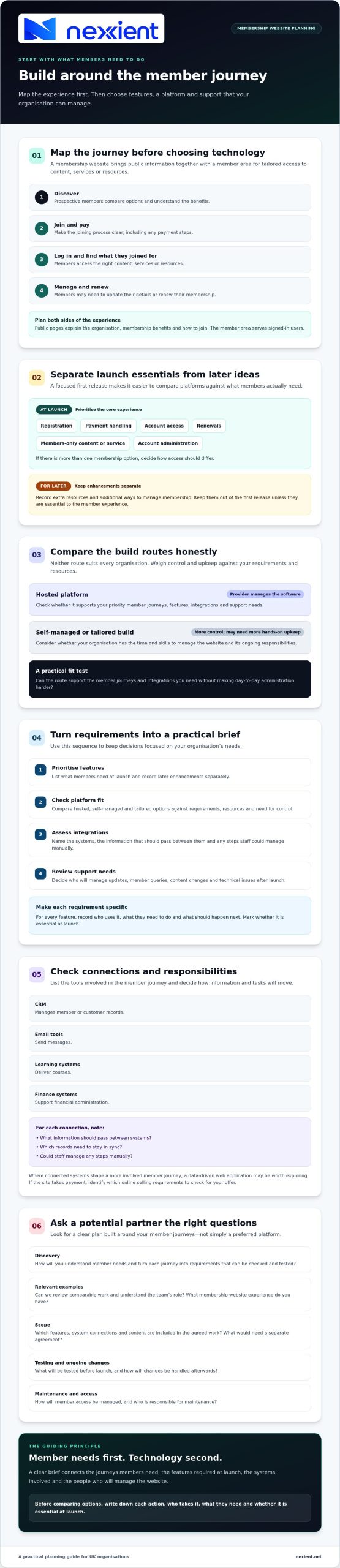
Plan for prospective and existing members separately. Someone considering membership may need to compare options, understand the benefits and join. An existing member may need to log in, find resources, update details or renew. Listing these actions makes it easier to see which features are essential and which can wait.
- At launch: prioritise joining, payment, account access and the core members-only content or service. Check how access should differ, if you offer more than one membership option.
- For later: note enhancements such as additional resources or more ways to manage membership. Keep them out of the first release unless they’re essential to the member experience.
Decide what should remain public, such as information about your organisation, membership benefits and how to join. A brochure website design can help you think through the role of public-facing information, while the membership area serves signed-in users.
Put the journeys into a short brief. For each action, record who takes it, what they need and whether it is essential at launch. This gives you a clearer foundation for building a membership website UK members can use and your organisation can manage.
How to plan membership website features and choose a platform
Use this sequence to turn member journeys into a practical project brief. It keeps platform comparisons focused on your organisation’s requirements rather than a long list of features you may not need.
- Prioritise features: decide whether members need registration, payment handling, renewals, restricted resources and account administration at launch. Record later enhancements separately.
- Check platform fit: compare hosted platforms, where the provider manages the software, with self-managed or tailored builds, which can offer more control but may need more hands-on upkeep. Neither option suits every organisation.
- Assess integrations: list the systems the website may need to connect with, what information should pass between them and whether staff could manage any steps manually.
- Review support needs: clarify who will manage updates, member queries, content changes and technical issues after launch.
The right route depends on the member journeys you need to support, the integrations they require and the time and skills available to manage the website. Use those criteria to judge whether a platform can support your needs without making day-to-day administration harder. That’s a practical test when building a membership website UK organisations can operate as well as launch.
Which features and integrations belong in the first project brief?
For each feature, record who uses it, what they need to do and what should happen next. A CRM manages member or customer records; email tools send messages, learning systems deliver courses, and finance systems support financial administration. Note whether information needs to move between these tools, which records need to stay in sync, or whether staff can manage the process manually.
Where connections between systems shape a more involved member journey, explore data-driven web applications, which use information to provide or manage specific functions. If the site takes payment, use GOV.UK guidance on online selling requirements to identify what to check for your offer.
Before choosing a provider, ask them to show how your priority journeys would work, including how member access is managed and who handles maintenance. If you’re weighing connected systems against your requirements, you can discuss the technical fit with Nexient. Ask about relevant membership experience as part of that conversation.
How to choose a UK membership website build partner and next steps
A good partner should turn your member journeys into a clear plan, not simply recommend a preferred platform. Ask how they’ll capture the requirements, what they’ll test before launch and how changes will be handled afterwards.
What should you ask before commissioning membership website development?
- Discovery: How will you understand member needs and turn each journey into requirements that can be checked and tested?
- Relevant examples: Can you review comparable work and ask the team about its role? Check their membership website experience rather than assuming it.
- What’s included: Which features, connections to other systems and content are included in the agreed work? What would need a separate agreement?
- Testing: How will the team check registration, payments, access permissions and renewals? Ask how they’ll test what happens if a step fails.
- After launch: Who manages content, platform updates, support and future changes? Agree responsibilities before work begins.
Clarify how the website will present membership terms and handle customer information. If members pay online, consult GOV.UK guidance on UK online selling regulations and check which requirements apply to your offer.
Nexient develops custom systems and data-driven web applications, which use information to provide or manage specific functions. This work may be relevant if member activities need to connect with existing processes or systems. Ask Nexient for relevant membership examples before deciding whether its approach is right for your project.
Prepare a short brief covering member journeys, the systems the website needs to connect with, launch priorities and ongoing support expectations. To explore whether your requirements align with Nexient’s web application or custom systems work, share your project priorities for an initial discussion.
Turn your membership plan into a clear next step
Building a membership website UK organisations can rely on starts with member needs, not platform popularity. Map the key journeys, decide which features are essential at launch, then compare hosted and tailored options against your integration and management requirements. A clear brief also helps you assess a partner’s approach to scope, testing and ongoing responsibilities.
Nexient develops data-driven web applications and custom CRM systems. Based in England, the team has a local focus on Worcestershire and can discuss your requirements and technical fit. Ask about membership-specific experience and confirm whether your chosen platform, payment and integration needs are within scope.
Bring your member journeys, existing systems and priorities to an initial conversation. Discuss your membership website requirements with Nexient and take the next step with a clearer plan.
Frequently Asked Questions
What should a membership website include?
A membership website should include the features members need to join, access their account and receive the content or services they’ve signed up for. Depending on your offer, that may mean registration, payment and renewal steps, member-only resources, account management and clear public information about membership. Prioritise what members need at launch, then plan additional features around actual requirements.
Should I use a hosted platform or build a custom membership website?
Choose a hosted platform if its features support your member journeys and you prefer the provider to manage the underlying platform. A custom build may suit specific processes or connections to existing systems, but brings different management responsibilities. The right choice for building a membership website UK organisations can sustain depends on functionality, integrations and internal capacity. Check a developer’s relevant experience before commissioning custom work.
How much does it cost to build a membership website in the UK?
There’s no single reliable cost: the total depends on the platform, required features, connections to other systems and ongoing support. Ask for an itemised estimate that separates initial design and development from recurring platform charges, online payment fees and maintenance. Compare like for like, and explain your launch priorities clearly so providers can identify what’s essential and what could be added later.
How long does it take to build a membership website?
The timeframe depends on the agreed work, how quickly content and decisions are ready, and the effort needed to connect and test payments, accounts and member resources. Ask potential providers for a project schedule with milestones, responsibilities and dependencies, including what they need from your team. If you’re a Worcestershire organisation considering Nexient, discuss the technical requirements and confirm membership-specific experience and timing directly.