A polished website can still leave potential customers unsure what to do next. Effective web design must do more than look good: it should explain what your business offers, help visitors find relevant information and make the next step clear.
For businesses in Worcestershire, that means planning the site around both customer needs and business goals. This article covers practical ways to set priorities for a new or refreshed website, from choosing the right pages to making calls to action easy to find. When design, development and strategy support the same purpose, visitors can move through the site with less guesswork.
Key Takeaways
- Effective web design brings a website’s appearance, structure and visitor experience together.
- Identify your audience and the main action you want the website to support before choosing features.
- Match the site structure to its purpose, whether it introduces your business, sells online or supports a campaign.
- Nexient combines clean design, development and practical strategy to shape websites around business needs.
What web design means for a business website
Web design brings together a website’s appearance, the way its information is organised and how visitors use it. It includes choices such as colour, typography, page layout and navigation, but each choice should serve a clear purpose. The Web design overview outlines the field’s broad scope. For a business, the priority is helping the right visitors understand what you offer and what they can do next.
Effective web design combines visual clarity, usability and purpose. Clear messaging tells visitors what your services are and who they are for. A useful page journey then helps them find the details they need. For example, a prospective customer might move from a service overview to specific information and then to an enquiry form. Review each page by asking: what should visitors understand here, and what is the most useful next step?
How design, user experience and development work together
User experience is how easily visitors can find information and complete tasks, such as browsing services, making an online purchase or sending an enquiry. A menu with clear labels, readable text and buttons that describe what happens next all make a site easier to use.
Visual design shapes what visitors see; development makes the features work. This could include building a navigation menu, enquiry form or online shop to match the design. Treat these as connected parts: a good-looking page needs working features, and those features need a clear, considered interface. Check that each supports the site’s purpose and gives visitors a straightforward route to the information or action they need.
How to turn business goals into practical web design priorities
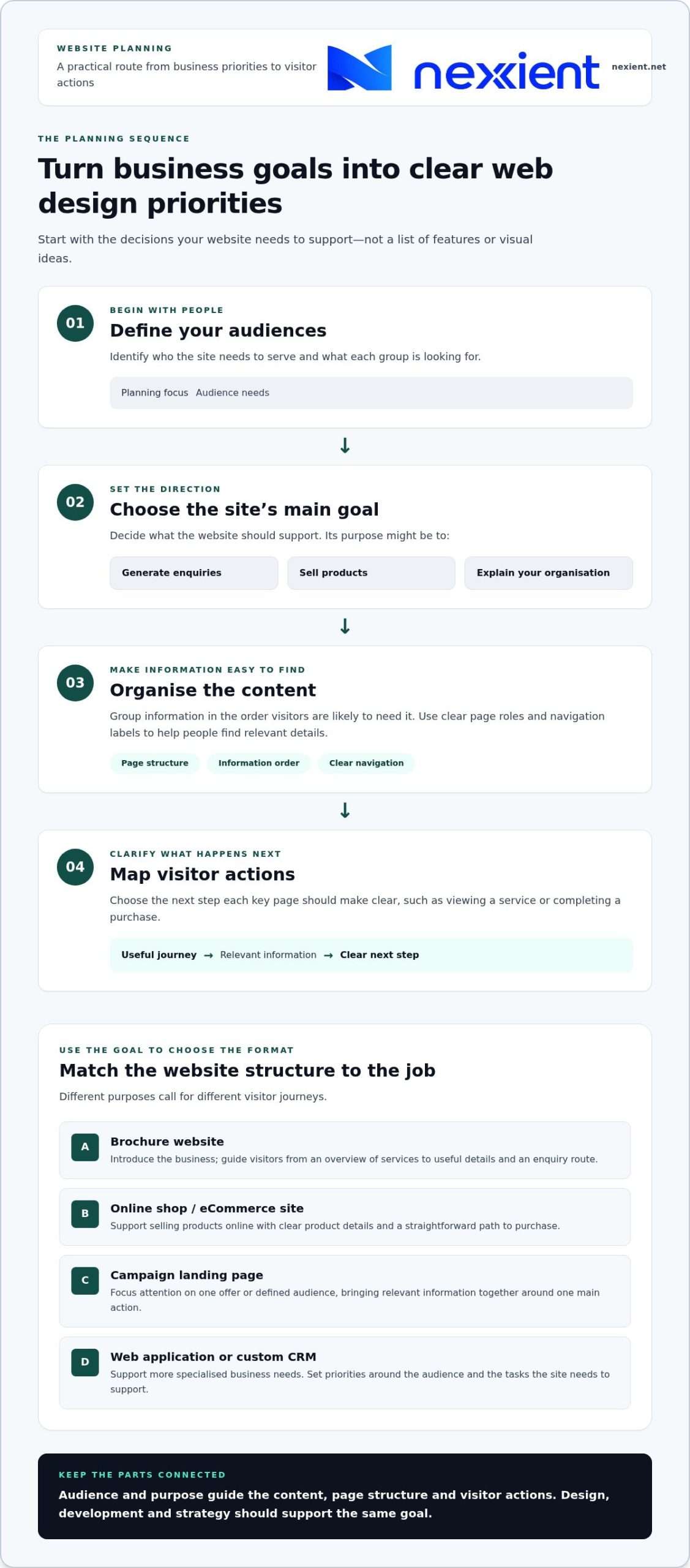
Start with the decisions your website needs to support, rather than a list of features or visual ideas. Use this sequence to keep planning focused:
- Define your audiences: identify who the site needs to serve and what each group is looking for.
- Set its main goal: decide whether the site should generate enquiries, sell products or explain your organisation.
- Organise the content: group information in the order visitors are likely to need it.
- Map visitor actions: choose the next step each key page should make clear, such as viewing a service or completing a purchase.
These decisions guide the page structure, the order and prominence of information, and the calls to action. A brochure site should make services, relevant business information and contact routes easy to find. An online shop needs clear product details and a straightforward path to purchase. A campaign page can focus attention on one offer and one main action. A structured web design process helps connect early planning with the finished site.
Match the website structure to what visitors need to do
For a business serving customers in Worcestershire, a brochure website can guide visitors from an overview of services to useful details and then to an enquiry route. Give each page a specific role and keep the navigation labels clear. Nexient designs brochure websites to present businesses online. If you’re planning a new project, discuss your website requirements with Nexient.
How Nexient brings web design from strategy to launch
A coherent website needs more than a polished visual direction. Nexient brings clean design, smart development and practical strategy together, connecting the purpose of a site with the experience visitors use. This helps keep decisions aligned, from what the site needs to communicate to how its features should work.
The right format depends on what the website needs to do. A business explaining its services may need a brochure website, while an organisation selling products online needs an eCommerce site designed around browsing and buying. A data-driven web application or custom CRM system can support more specialised business needs. Set the format and priorities according to the audience and the tasks the site needs to support, without adding complexity that does not serve its purpose.
Choose a website format that fits the job
A focused campaign page can suit a specific offer or a defined audience. Rather than asking visitors to explore a full site, it brings relevant information together around one clear next step. Explore Nexient’s landing-page service for a campaign that needs this focused approach.
Before a project moves forward, write down the main goal, the audience and the action you want visitors to take. These give design and development a shared direction. For businesses in Worcestershire, Nexient brings those practical considerations into websites designed around the needs of the organisation.
When planning a new site or refresh, start by deciding what visitors should understand and do. Then use those priorities to guide the design and development.
Build a website around your next business goal
Effective web design connects business goals with what visitors need to see and do. Start by defining your audience, choosing the site’s main purpose and making the next step clear. Choose a format to match that purpose: a brochure website, online shop or landing page each serves a different need.
Nexient combines clean design, smart development and practical strategy to create brochure websites, eCommerce sites and landing pages around each project. This approach plans the website as a joined-up experience, rather than a collection of attractive pages.
Ready to turn your priorities into a clear plan? Discuss your website goals with Nexient and take the next step towards a site that reflects your business and gives visitors a clearer way forward.
Frequently Asked Questions
What does web design include?
Web design includes a website’s visual appearance, the way its pages and information are organised, and how easily visitors can use it. It also involves planning how people move between pages and what actions they can take. Development makes the site’s features work, bringing the design and visitor journey together.
Why is web design important for a business?
Good web design helps visitors understand what your business offers and find a useful next step. Clear service information, straightforward navigation and visible contact details make it easier for potential customers to explore your offer. For a Worcestershire business, a well-planned website can present a consistent, professional impression to people considering your services.
How do I know what type of website my business needs?
Choose a website format by starting with your audience and the main task the site should support. A brochure website can present services and contact routes, an eCommerce site supports online sales, and a landing page focuses on a particular offer or audience. List the essential content and actions visitors need to take, then use that list to set priorities.
Can good web design help a website generate more enquiries?
Good design can make it easier for visitors to understand your services and enquire, though it can’t guarantee a particular result. Make contact details easy to find, explain what happens next and use clear calls to action, such as an enquiry button beside relevant service information. Review the journey from the first page a visitor sees to the point of contact.